How NVIDIA Holoscan 5 enables gravity-compensated robot control
Why Holoscan is useful
The Holoscan SDK brings low-latency control and high-throughput data processing together in a single programming model. It is designed for workloads running on both CPUs and GPUs. The runtime is meant to reduce unnecessary overhead and make it clear how an application executes.
Operators can be grouped into a partition, where they run in sequence on a single thread without thread switches or extra system calls. Timers or incoming data trigger execution, while bounded queues that drop the oldest items prevent stale data from piling up.
Existing algorithms can be integrated without rewriting them for the framework. Holoscan 5 adds a lightweight programming model that is easier to embed in existing codebases, along with a more convenient way to exchange data with graphs.
The same model can support CPU motor-control loops running at 10 kHz, compute-intensive GPU workloads and AI inference. Developers can describe execution using operators, ports and graphs, split workloads across multiple graphs, pin partitions to CPU cores, run them on CUDA Green contexts or launch them as CUDA graphs.
Operators can also specify timing requirements. Before the first run, Holoscan compiles an execution plan that can be inspected to catch configuration errors before deployment on hardware. Built-in NVTX markers show operator activity and message transfers in Nsight Systems. This makes it possible to analyze CPU-side latency and update jitter, then repeat the measurements as the application evolves.
A manipulator for torque control
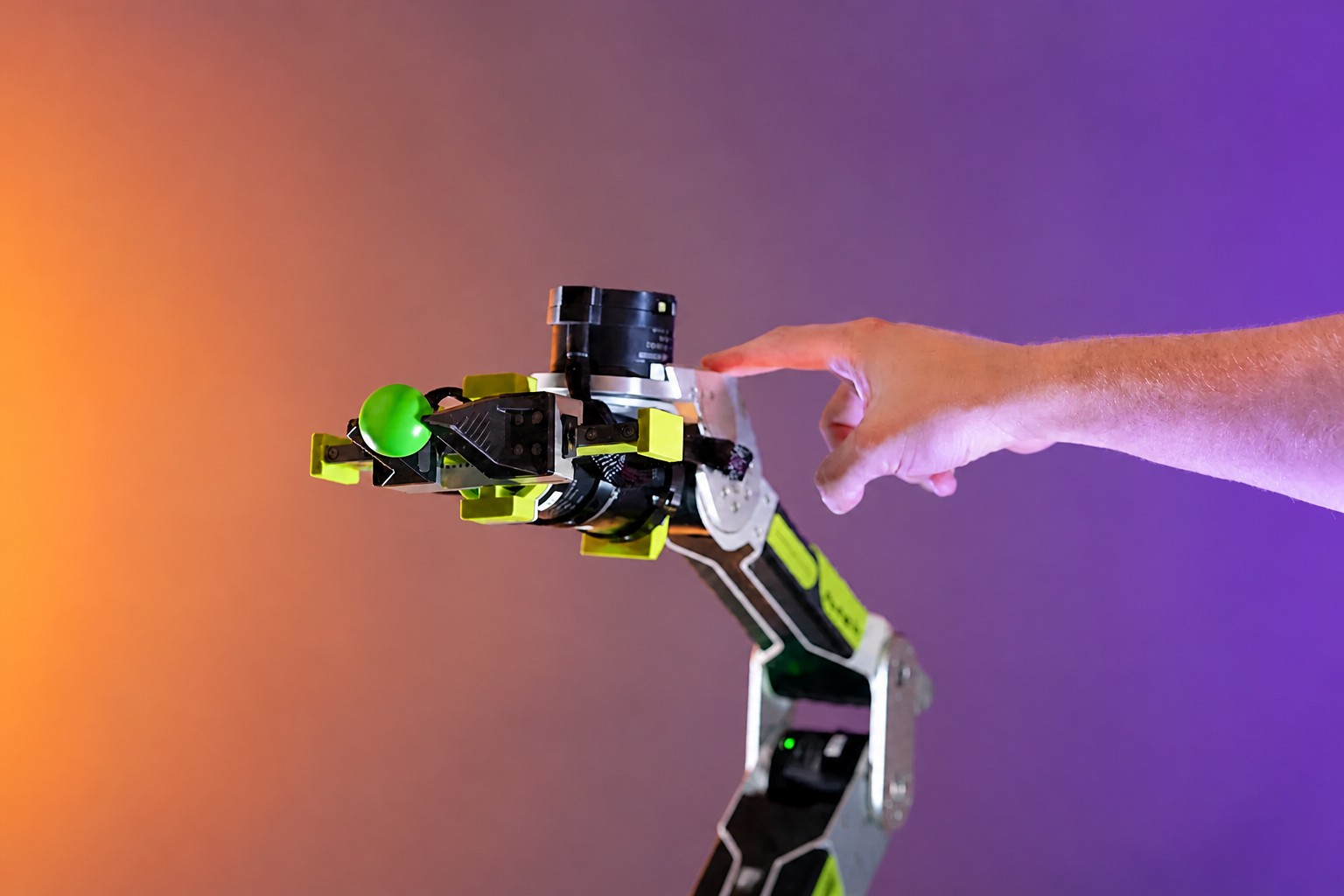
The example uses the Seeed Studio reBot Arm B601-DM, an accessible platform for learning modern robot control. Low-cost manipulators often use hobby servos with high gear ratios that support position control only. The reBot Arm uses quasi-direct-drive (QDD) actuators, which provide broad bandwidth for control and measurement. This is useful for tactile interaction, human-robot collaboration and other torque-control tasks.
Gravity compensation helps test how closely a robot model matches its physical construction before perception and motion planning systems are added. Position-only control can hide errors in joint axes, offsets, link placement, masses and moments of inertia. With gravity compensation, such errors immediately affect the required torque: incorrect Denavit–Hartenberg parameters or mass properties can make the arm sag or rise as its pose changes.
Even if the final system does not need gravity compensation, torque control makes it possible to tune how the robot responds to external forces. In this example, gravity compensation is combined with low stiffness and damping: the arm supports its own weight but yields to a person’s hand.
This kind of control requires fast, predictable measurements—hundreds or thousands of times per second. Runtime overhead and thread switches add phase delay and jitter, which can undermine the robot’s stability.
Pinocchio calculates the inverse dynamics. The library loads the robot model in URDF format and uses the recursive Newton–Euler algorithm (RNEA) to calculate joint torques for given positions, velocities and accelerations. The motorbridge library reads joint measurements and sends commands to the motors.
Setting up the Python example
The guide uses the Holoscan Python API. The repository also includes a full C++ implementation with its own build instructions. Both versions use the same three-operator control loop.
You need a Linux system with Python 3.12 or later. From the repository root, run:
python3.12 -m venv build/python-venv
build/python-venv/bin/python -m pip install --only-binary=:all: -r requirements-python.txt
build/python-venv/bin/python -m pip check
Then check the serial port and motor IDs in the manipulator’s configuration file. The repository’s technical guide covers setup, the mathematics and running the hardware.
Video 1. A responsive robot with Holoscan installed for gravity compensation workload vs. a custom script runtime
Source: developer.nvidia.com
The three operators in the control loop
Holoscan 5 has two core concepts: operators and graphs. Reading the robot’s state, calculating a command with the inverse-dynamics solver and sending the command to the manipulator are handled by three operators.
Custom operators have three important methods. The guide refers to their list as a table of key methods, but does not provide the method names in the text.
1. Reading joint states on a timer
JointStateSourceOp declares an output in setup(). Its OnClock contract triggers it every 2.5 ms, or at 400 Hz. Each time compute() runs, the operator reads the state of all seven motors and sends it on.
import holoscan as hsdk

class JointStateSourceOp(hsdk.Operator):
    state = hsdk.Output("state", hsdk.pyobject)

    def setup(self, spec):
        spec.output(self.state)

    def contract(self):
        return hsdk.Contract().trigger(hsdk.OnClock(period=hsdk.time.us(2500)))

    def start(self):
        self.sequence = 0

    def compute(self, ctx):
        self.sequence += 1
        self.state.emit(robot.read_state(self.sequence))
2. Calculating compensation when data arrives
PinocchioGravityOp declares an input for the state and an output for the command. The OnEach operator triggers a calculation whenever a new state arrives. The hsdk.Param parameters set the gain values, torque scaling and joint directions.
class PinocchioGravityOp(hsdk.Operator):
    state = hsdk.Input("state", hsdk.pyobject)
    command = hsdk.Output("command", hsdk.pyobject)
    kp = hsdk.Param(1.5, range=(0.0, 500.0))
    kd = hsdk.Param(1.0, range=(0.0, 5.0))
    tau_scale = hsdk.Param([1.0] * 6)
    joint_direction = hsdk.Param([1.0] * 6)

    def setup(self, spec):
        spec.input(self.state, queue_depth=1)
        spec.output(self.command)

    def contract(self):
        return hsdk.Contract().trigger(hsdk.OnEach(self.state))

    def compute(self, ctx):
        state = self.state.receive_data()
        command = controller.compute(
            state, kp=self.kp, kd=self.kd,
            tau_scale=self.tau_scale, joint_direction=self.joint_direction)
        self.command.emit(command)
Inside compute(), the operator passes the received state and current parameters to a helper function. The function maps the manipulator’s six angles to the URDF model, checks the limits and gets the gravity torques from Pinocchio:
gravity = pin.computeGeneralizedGravity(self.model, self.data, self.q)[self.v_indices]The calculated torques are added to the motor commands as feedforward compensation, alongside position, velocity, stiffness and damping. The first command already includes the gravity component and the specified compliance settings.
3. Sending commands to the motors
MotorCommandSinkOp declares one input and runs whenever a command arrives. Its compute() method passes the command to a robot helper module. The module checks whether the command has expired, whether commands are out of order and whether the command is within the allowed range, then sends a packet to the motors.
class MotorCommandSinkOp(hsdk.Operator):
    command = hsdk.Input("command", hsdk.pyobject)

    def setup(self, spec):
        spec.input(self.command, queue_depth=1)

    def contract(self):
        return hsdk.Contract().trigger(hsdk.OnEach(self.command))

    def compute(self, ctx):
        robot.send_command(self.command.receive_data())

    def stop(self):
        robot.disable()
After sending commands to all seven motors, the helper module records the completion time. If no send completes within 100 ms—the default value—the watchdog attempts to disable the motors and stops the graph. The operator’s stop() method also disables the motors.
Video 2. The controller updates while the joint torques as the pose changes
Source: developer.nvidia.com
Building and running the graph
The operators are connected through ports, and the compensation parameters are passed when the operator is created:
graph = hsdk.Graph("rebot-gravity", default_clock=hsdk.RealtimeClock)
source = graph.op(JointStateSourceOp, "joint_feedback")
gravity = graph.op(PinocchioGravityOp, "gravity", **controller.parameters.operator_kwargs())
sink = graph.op(MotorCommandSinkOp, "motor_commands")
graph.add_flow(source.state, gravity.state, queue_depth=1, queue_policy=hsdk.QueuePolicy.DROP_OLDEST)
graph.add_flow(gravity.command, sink.command, queue_depth=1, queue_policy=hsdk.QueuePolicy.DROP_OLDEST)
graph.partition("control").add(source).add(gravity).add(sink)
A partition runs the callbacks of its operators sequentially on a single thread managed by the runtime. All three operators are in the control partition, so passing the state, calculating torque and sending the command require no thread switches. The source sets the rate, while the other operators follow the incoming data. Queues with a depth of one that drop the oldest data prevent stale samples from accumulating.
Before the motors are enabled, Holoscan compiles the description into an execution plan that can be checked:
plan = hsdk.compile(build_graph(robot, controller))
if not plan:
    raise RuntimeError(plan.summary())

prepare_gravity_compensation(robot, controller)
hsdk.run_async(plan)
The model and motors are initialized in prepare_gravity_compensation() after the graph is compiled and immediately before it runs. Signal handlers set stop_requested when Ctrl+C is pressed. The main loop monitors command execution, while a context manager stops the graph and waits for its threads to finish. The lifecycle handling also covers startup, watchdogs and shutdown.
Testing the manipulator
Before starting, place the arm in a safe initial position with the power off:
build/python-venv/bin/python python/gravity_compensation.pyWhen Gravity compensation active appears, the arm can be guided by hand. Return it to its initial position before pressing Ctrl+C: the stop command disables the motors.
Measuring latency and jitter
Holoscan integrates with NVIDIA Nsight Systems to analyze CPU and GPU task execution. Profiling requires no special decorators or custom timing code: just run the application without changes.
mkdir -p build/profiles
nsys profile -t nvtx --sample=none --backtrace=none --cpuctxsw=none \
  -o build/profiles/gravity-python \
  build/python-venv/bin/python python/gravity_compensation.py
A summary of the time ranges can be generated with the standard command:
nsys stats --report nvtx_sum build/profiles/gravity-python.nsys-rep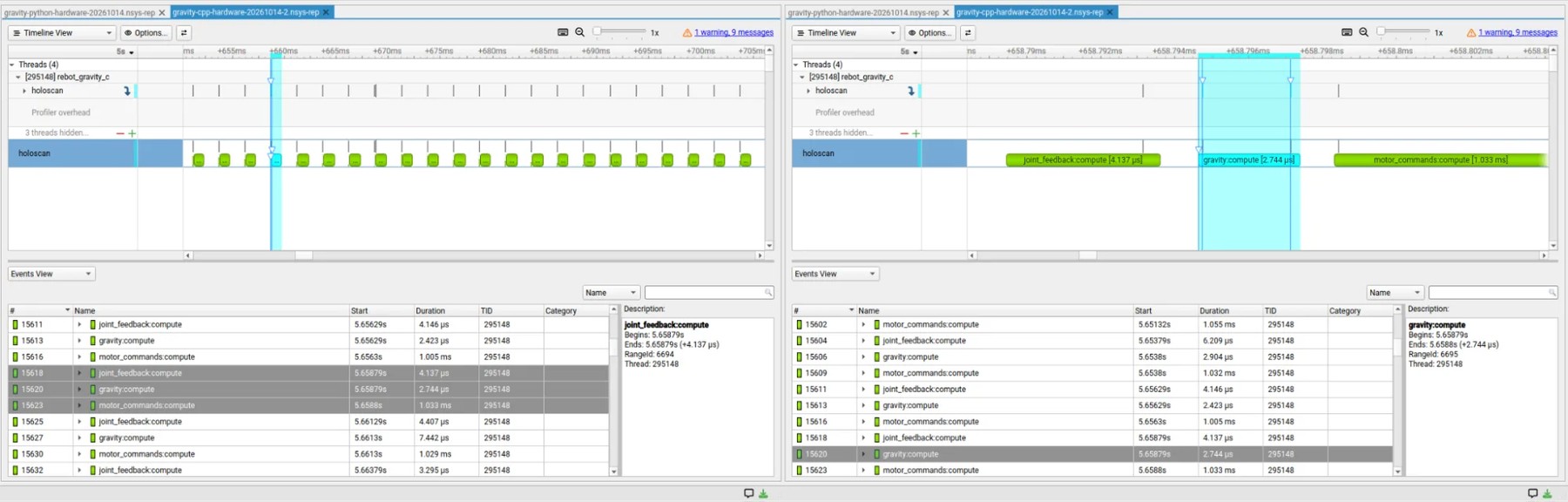
Figure 2. NVIDIA Nsight Systems (nsys) timeline and NVTX event trace showing task timing and latency across operators
Source: developer.nvidia.com
Pinning threads to CPU cores
Holoscan’s deployment interface can pin the control partition to a CPU core. In the reported runs, helper and profiler threads were placed on another core, while two physical cores and their SMT threads were temporarily reserved from other applications using a Linux control group. This setup does not require rebuilding the kernel, changing boot parameters or restarting the computer. However, interrupts, timers and some kernel threads can still run on the reserved cores.
The authors compared four configurations, collecting more than a million cycles in each run. Holoscan latency was measured from entry into the first operator to entry into the last; sending commands to the motors was not included. Pinned runs are shown as solid lines in the chart, and unpinned runs as dashed lines. The source also presents latency distributions for C++ and Python pipelines, with and without pinning, in a table, but the table’s numerical values are not included in the text.
With thread pinning and core isolation, observed latency at the p99.99 level fell by about 5 times for C++ and 9.6 times for Python. Measurements were taken sequentially with profiling enabled; the first ten seconds were excluded, while latency outliers were retained.
Both Holoscan versions call the Pinocchio solver, which is written in C++. But Python adds interpreter work, object allocation and interaction with the Global Interpreter Lock (GIL) around Pinocchio and the Holoscan runtime. These costs matter for CPU control loops with latency budgets measured in microseconds. C++ offers more control over memory allocation and system calls on the critical path, although the example still allocates memory and is not a system-call-free pipeline.
For GPU perception workloads that take milliseconds or tens of milliseconds, small memory allocations and individual CPU system calls are usually less significant: the computations themselves take orders of magnitude longer. Python remains a practical way to build such pipelines when their components are implemented in CUDA.
Video 3. Real-time Cartesian position hold, maintaining target orientation while remaining haptically compliant
Source: developer.nvidia.com
From gravity compensation to full control
The basic loop consists of three Holoscan operators: one reads joint states on a timer, another calculates gravity torques with Pinocchio, and the third sends commands to the motors. Holoscan checks the graph before the motors are enabled, and Nsight Systems can be used to inspect its execution.
Gravity compensation is a foundation, not a complete control system. The repository includes a second Python example that adds kinematics and impedance control as reusable Holoscan operators. It accepts target positions and orientations, for example from a trained policy, while keeping the arm compliant when touched.
This provides a basis for developing hand-guided learning, teleoperation and object manipulation. To add perception, the guide proposes using the Holoscan computer vision module and NVIDIA Isaac ROS components, which include reusable Holoscan operators and reference applications, including GR00T inference.
The authors recommend downloading the Holoscan 5 SDK and using the full guide to continue.
Dataist’s take: The example shows how splitting control into operators and checking the graph before startup can help manage a robotic control loop. The latency results, however, come from sequential runs with profiling enabled, and the measured interval does not include sending commands to the motors.
Daily AI news
Every day we pick what actually matters in AI and explain it plainly — no hype, no filler. Subscribe if you want to follow where the industry is going.
Only what matters — every day
Follow on X