GroundCUA matches desktop grounding baselines with 700K examples, not 9M

Agents that operate a computer keep failing at a step that looks trivial: finding the element on screen that a human instruction describes. That grounding is hardest on interfaces crowded with tiny controls, near-identical panels, high resolution, visual noise and rendering artifacts. The GroundCUA team shows how to solve this narrow but load-bearing problem — making the link between language and interface accurate and reliable enough for an agent to execute actions confidently, step by step.

What the paper does
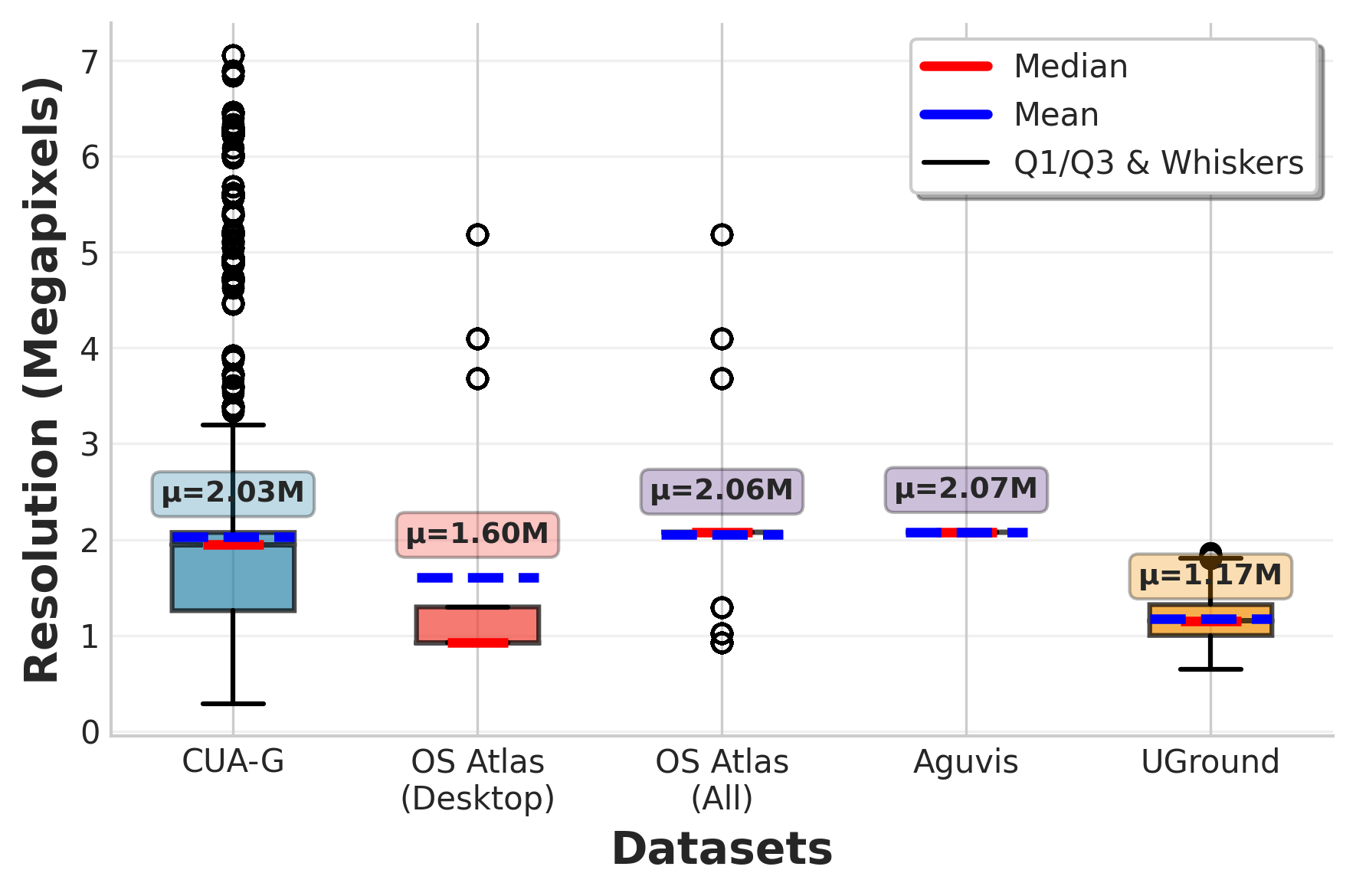
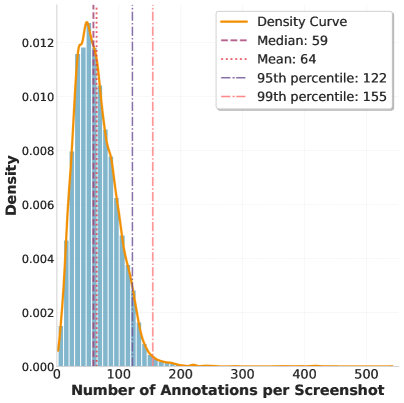
The researchers built GroundCUA, a dataset for desktop interface grounding assembled from real expert demonstrations. It covers 87 applications across 12 categories and holds 56,000 screenshots with more than 3.56 million carefully verified annotations of nearly every visible element. Half the elements carry a category, and image resolution ranges from 0.39 to 7 megapixels. A frame carries 64 annotated objects on average: a lot of very small boxes, a lot of categories. The result is a solid cross-section of real work at a computer.


How the data and instructions were collected
GroundCUA does not need a random crawl of interfaces: annotators perform everyday tasks in different applications, record the screen, pick key frames and label every element with a box and a caption. Long captions are filled in with OCR. From that dense labeling, a large language model generates three kinds of instructions: direct ones, by attributes and surroundings; functional ones, by what the element is for; and spatial ones, relative to anchors. That yields 700,000 cases for fine-tuning and 10,000 for reinforcement learning.
Why it works
The authors argue that tens of thousands of real frames, densely and thoroughly labeled, are worth more than a million synthetic scenes. That teaches the model to handle ambiguity and elements that are small and visually alike.
How the models were trained
On top of Qwen2.5-VL-Instruct, the authors trained two versions of GroundNext, at 3 and 7 billion parameters. Training ran in two stages:
- Supervised fine-tuning on 700,000 screenshot-instruction pairs. Given an instruction, the model predicts the coordinates of a point on the screen. The 10,000 held-out cases go to reinforcement learning. The reward is a discrete function of the distance from the target box: a penalty outside it, more credit closer to the center. This scheme makes RL markedly simpler and raises quality on difficult interfaces.
- The model gains an additional edge from reinforcement learning, and the reinforcement learning itself gets easier thanks to a well-chosen action space and reward function.
What the numbers show
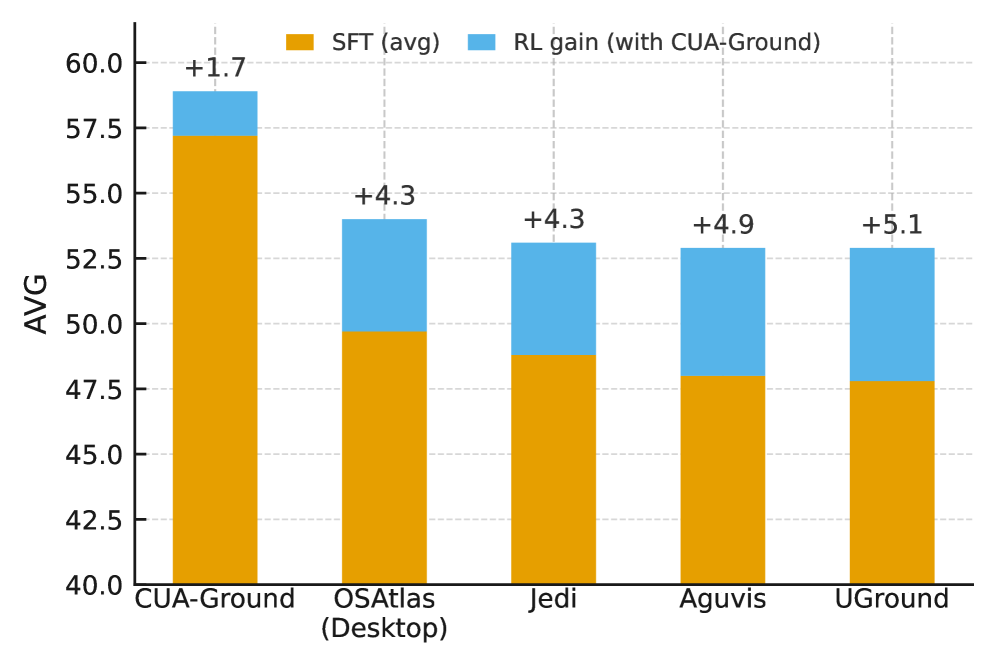
Across five datasets for desktop interface grounding, the model reaches baseline level while training on 700,000 examples against JEDI's 9 million.
- Reinforcement learning adds a small but consistent gain on top of SFT.
- On the OSWorld-Verified agent benchmark with o3 as the planner, the model scores 50.6, ahead of several larger models and just below JEDI-7B, while needing far fewer resources to fine-tune. That is a good result, given how much less data goes into it.
- Transfer to mobile and web interfaces is clear: on the corresponding benchmarks the model reaches quality comparable to competitors that were fed matching data on top.
Where the gains stand out
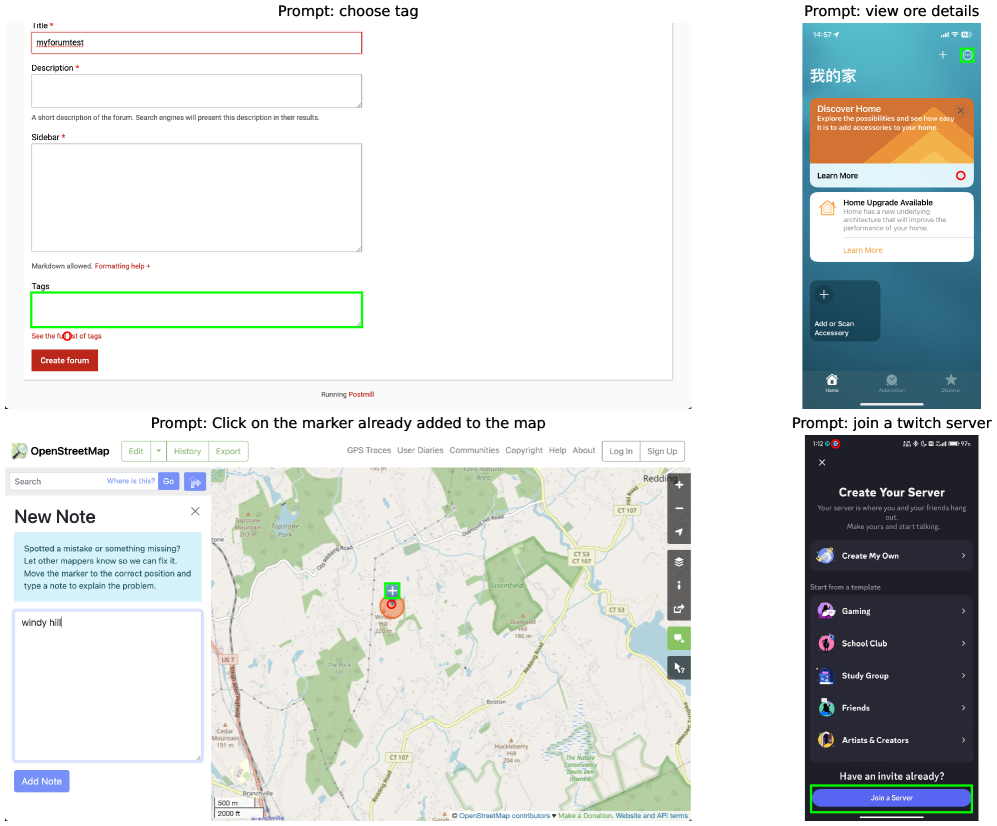
On the Linux and macOS datasets: they are full of small icons, and the effect of hand labeling is easy to see there. Among application categories, office, development and creative tools come out best: they are full of cases where visually similar elements have to be told apart, and labels distinguished from the containers holding them.
Why it matters
Agents that handle real computer tasks well have to do more than plan actions — they have to land on the right elements, the way the user asked. GroundCUA shows that broad application coverage plus dense labeling of the frames that matter is what makes grounding work.
To my mind, the future of computer-use agents depends not on model size but on the precise fit between language and interface — and GroundCUA takes a real step in exactly that direction.
AI paper breakdowns
Every day we read the new AI papers and retell what matters in plain language — no hype, no filler. If you want to see where AI agents are heading before everyone else, subscribe.
New breakdowns every day.
Follow on X