A canvas instead of a chat
AI can turn out images, video, websites, slides and music from a single prompt. Real creative work does not run that way. You almost never reach the final version in one sentence. There are references, rough drafts, versions that worked and versions that did not, edits, branching revisions, notes from colleagues and a pile of small decisions along the way.
That middle life of a project is what tools usually lose. A chat remembers the conversation as a straight line. Generators hand over a finished result and forget how they got there. Node-based editors make the steps visible, but they normally require you to wire the pipeline together by hand. The result is an AI agent that can generate something, yet struggles to hold an entire project in its head for long without losing the thread.
The JarvisHub paper proposes a move that looks simple and turns out to matter: make the canvas, not the chat, the center of the system. A shared workspace that holds everything — prompts, images, notes, links between artifacts, versions, statuses, the user's own edits. Both the person and the AI agent see this canvas. Both can read it and change it.
This matters for one reason: if you want an AI agent to carry a long creative task rather than produce a single artifact, it needs more than access to models. It needs memory of the project.
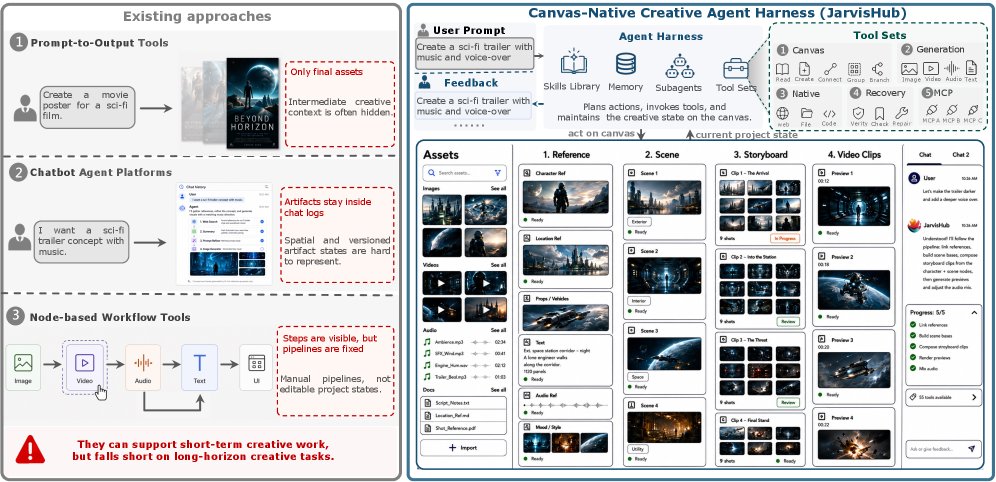
Why ordinary generators and chat agents fall short on long creative work, and what makes JarvisHub different.
What the authors actually propose
JarvisHub is an open framework for multimodal creative AI agents. The core idea: the project lives as an editable graph on a canvas. Every object is a node — the task text, a reference image, a storyboard frame, a draft website, a video clip, a slide, a user comment. Edges connect them: what builds on what, which version grew out of which, which artifact was rejected and which was accepted.
It sounds like an engineering detail, but in practice it changes how the AI agent operates. It no longer lives inside a message history. It works against external project state.
The authors split the system into three layers:
This is the separation of concerns you would expect in a well-built system: memory in one place, access control in another, action logic in a third. The design exists so the AI agent cannot rewrite the project at random and so every action can be traced.
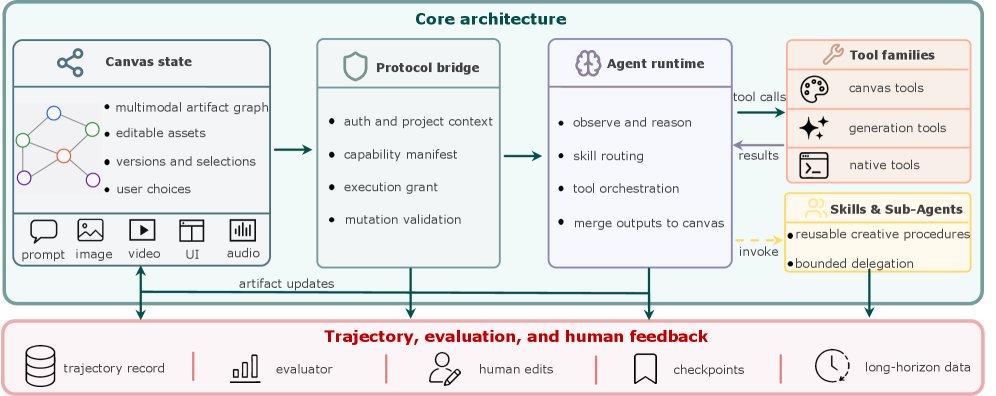
The JarvisHub architecture: canvas state, the protocol bridge and the agent execution runtime.
Where the chat interface breaks down
A linear chat is convenient while the task is short. On long work it becomes a bottleneck fast.
Say you are making a short video piece. There are characters, a style, locations, a scene order, alternative shots, discarded attempts, good details worth keeping. None of that fits comfortably into a thread of messages. A chat is poor at showing branching versions, a local fix to one specific frame, or the dependency of one scene on another.
The canvas handles this differently. It makes project state explicit. Every artifact has an address. You can point at it, reuse it, roll it back, fix it in place or wire it into a new step.
The authors single out three properties of this approach:
For creative work this matters more than usual. There is rarely one correct answer. What counts is the path: what was chosen, what was dropped and why.
How the agent loop works
Each turn in JarvisHub runs roughly like this. The user gives a prompt. The AI agent looks at the current canvas. The protocol bridge states which actions are permitted on this turn. The agent then picks a step: read nodes, create a new artifact, call image generation, run an external tool, ask for clarification, apply a fix. The result is validated, and only then written to the canvas.
The system does not let the agent quietly live inside its own internal logic. Any useful action has to become a checkable change to the shared state.
The authors lay out the families of tools the runtime draws on:
Three more constructs sit on top of that: skills, memory and subagents. Skills define repeatable procedures such as assembling a deck or building a storyboard. Memory keeps preferences and past decisions. Subagents fan the work out when parts of a task can run in parallel.
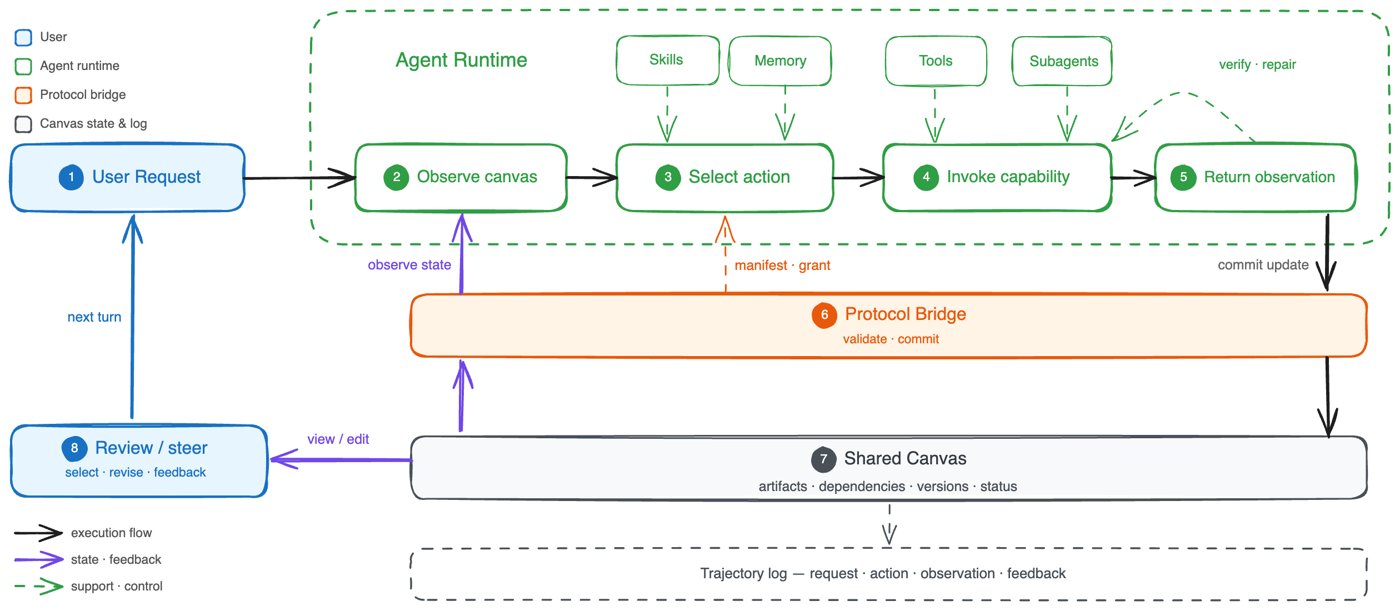
The AI agent loop: observe the canvas, choose an action, call a tool and write back a validated result.
Where it was tested
The authors do not build a formal benchmark with numbers. Instead they walk through three long creative scenarios in the same environment:
The stack underneath: GPT-5.5 as the agent's main brain, GPT Image 2 for stills, Seedance 2.0 for video and Gemini 3.1 Pro as the multimodal evaluator.
This is not a model competition. The question is a different one: does a shared canvas help carry a long task without the project falling apart along the way.
What the examples show
The most telling part of the work is not the final outputs but the traces of the process. The authors show the workspace as well as the finished artifacts: notes, intermediate images, dependencies, task status, previews, drafts.
In the narrative video case the canvas holds a short summary of the story, visual references, candidate frames and the links between them. That is what keeps characters and locations consistent from scene to scene.
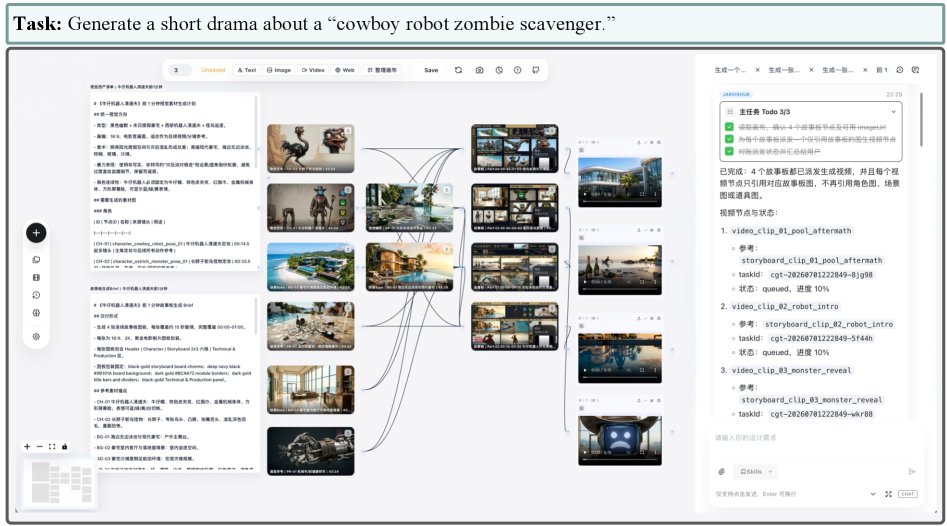
Canvas traces for narrative media generation: the plan, references, candidate frames and the links between them.
In the web development case the canvas carries the site description, visual direction, layouts, code artifacts, page previews and the state of the edits. Because of that the agent is not just writing code, it is working in project mode: comparing, revising, returning to earlier decisions.
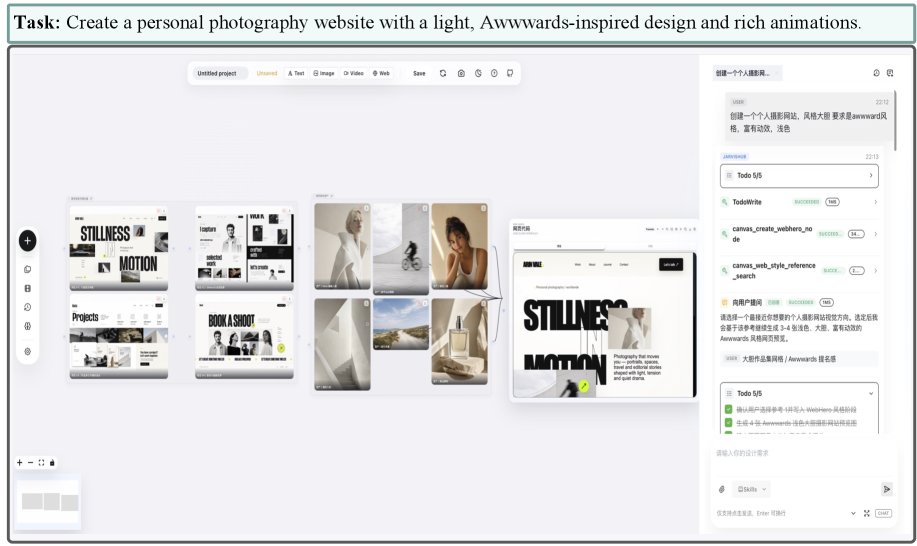
Canvas traces for building a website: the brief, references, layouts, implementation artifacts and the state of the edits.
In the presentation case the same principle carries over to slides. The canvas stores the lecture structure, diagrams, slide drafts, the links between content and visual elements, and a preview of the finished deck.
The shared lesson from these examples is a simple one: the system stores not only the result but the context needed for the next step.
Why this matters for research and for products
The paper makes an interesting point: the object of analysis should be the trajectory, not only the final artifact. Otherwise you see a handsome image or a decent website without knowing how the AI agent got there. It might have ignored the references, lost the versions that were chosen, regenerated everything from scratch instead of making a local fix, and landed on an acceptable result by accident.
JarvisHub records the trajectory step by step: the prompt, canvas state, available actions, the action chosen, the observation returned by the tool, feedback, the decision to repair, the new state. A log like that makes the process reproducible.
Several practical consequences follow from this at once:
This lands at the right moment, with plenty of commercial products already moving toward an agentic creative mode while their internals stay closed. You can see what they manage to do; you cannot see how they hold project state.
Limitations
The authors are candid about where the approach stops.
First, this is a qualitative demonstration, not a strict benchmark with numeric metrics and a leaderboard. It shows the framework working on substantial scenarios; it does not measure it in a standardized race.
Second, JarvisHub is responsible for orchestration and state management, not for the quality of the generation itself. If the underlying image or video model is weak, the canvas will not fix that.
Third, validating actions through the protocol makes the system more reliable but does not guarantee that a creative decision is semantically right. The agent can still pick a bad move; the difference is that the move is now recorded and visible.
Finally, trajectories are useful for analysis and for future training, but they raise questions of user consent, anonymization and copyright the moment you start keeping them.
The takeaway
JarvisHub argues for treating a creative AI agent as a participant in a project rather than a generator on demand. To do that it hands the agent a shared workspace — a canvas holding artifacts, versions, dependencies, statuses and edits.
The paper's central idea is a new unit for organizing the work. When a long task demands memory, local fixes, branching and feedback, a chat turns out to be too narrow an interface. A canvas fits better, because it turns the project into explicit state you can work through step by step.
What grows out of this could be the next infrastructure layer for AI agents: not another image or slide generator, but an environment where the whole path from prompt to result stays visible. For creative systems that is no longer a convenient addition. It is a precondition, if you want an AI agent to carry a project over time, consistently and under human control.
AI papers in plain words
Every day we read the new AI papers and retell what matters in plain language — no hype, no filler. If you want to see where AI agents are heading before everyone else, subscribe.
New breakdowns every day
Follow on X