LLM-simulated interfaces train web agents better than real sites do
AI agents are data-hungry: they need thousands of varied scenarios for working with websites and mobile apps. Assembling a set like that by hand is slow and expensive. Even a few hundred tasks with long action chains means thousands of hours of engineering, annotation and infrastructure. The authors of UI-Simulator propose an alternative: instead of collecting everything in real environments, synthesize rich interface states and action trajectories directly with an LLM. The bet is on a diversity of worlds and on robustness to changes in layout, content and logic.
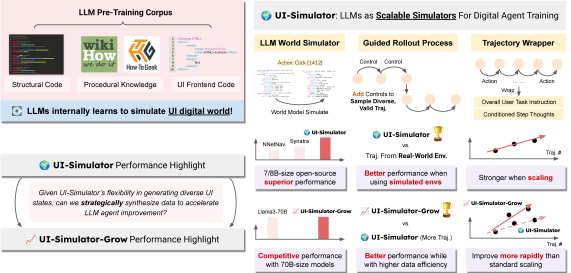
The idea in brief
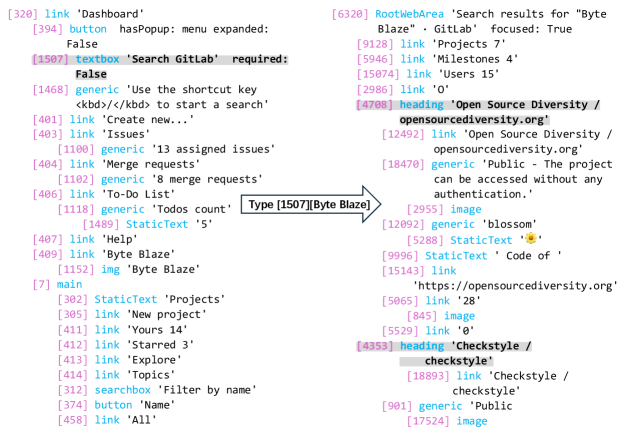
The team builds a world model on top of an LLM that generates the next UI state from the current state and an action. Guided rollouts are run against that simulator and then turned into training examples. The result is a scenario factory that never requires a real website or app to be deployed.
The framework rests on three pillars:
- An LLM simulator of the digital world: it synthesizes new, plausible UI states and transitions.
- Guided rollouts: step-by-step control over goals, so the trajectories stay coherent and varied.
- A trajectory wrapper: it turns rollouts into clean training trajectories with an instruction, actions and reasoning.
How the world simulator works
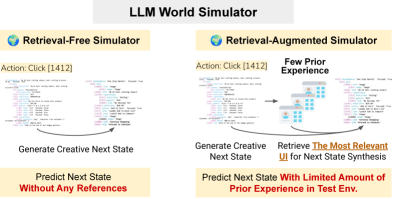
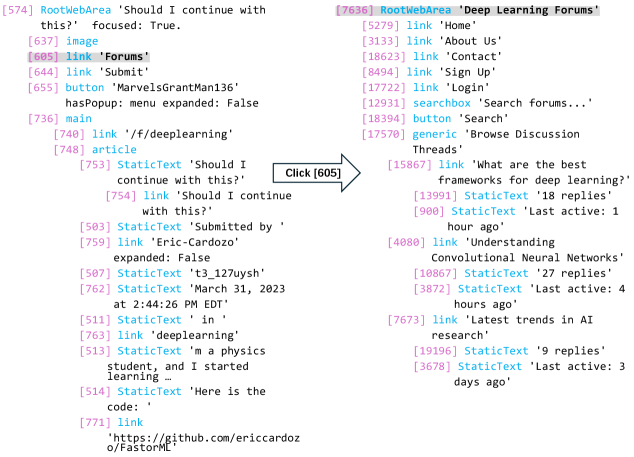
An interface state is represented as an accessibility tree with text, coordinates and dynamic attributes. The simulation runs in stages: first a short sketch of what should come next, then a natural-language draft of the page, and only then a strict structured form with coordinates. Deterministic behavior such as scrolling is handled by rules. To adapt quickly to a new environment, the authors add a retriever: it pulls in similar observations and makes the next step more realistic even when there is almost no direct experience in that environment.
Collecting data without a stated instruction
Ordinary data collection gets stuck on boilerplate actions and on errors that are hard to spot. Here a GPT-4o-mini teacher runs step-by-step exploration with brief task checks. It breaks the search into subgoals itself and produces a thought, an action and a short step summary. At the end, the wrapper condenses the history into a legible user goal and rewrites the thoughts so they match the final instruction. Filters strip out invalid clicks and logical inconsistencies. What comes out is compact, valid, readable trajectories.
What targeted scaling buys you
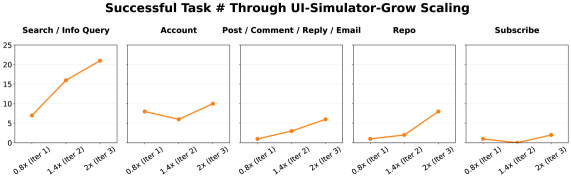
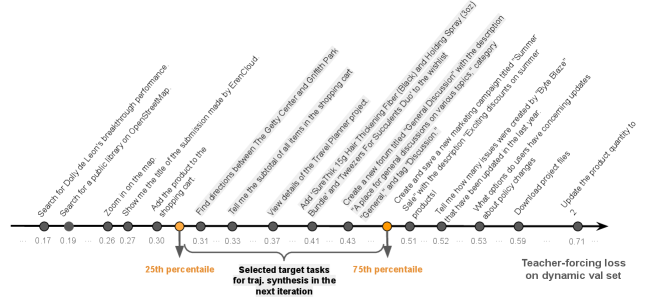
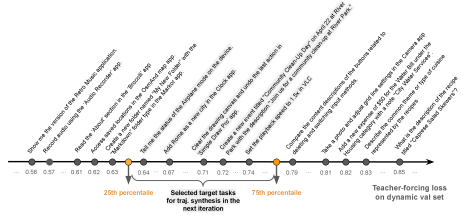
Piling on data blindly does not always help. UI-Simulator-Grow picks the tasks that move the model furthest: it ranks them by teacher-forcing loss and takes the useful middle band, dropping the ones that are too easy along with the ones that are too noisy. It then synthesizes substantive variations of those tasks, keeping the action logic and swapping the entities. There is also replay from earlier iterations, so skills are not forgotten.
How it performs in practice
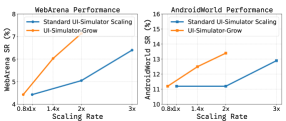
Tests on WebArena and AndroidWorld show that even the base version, with no contact with real environments, raises the bar considerably: from the 2–5% SR of the starting models to 6.28% on WebArena and 8.6% on AndroidWorld. With the retriever, the numbers rise to 6.40% and 12.9%. The Grow version reaches 7.14% on WebArena and 13.4% on AndroidWorld — on par with larger or more expensive models. Note that the teacher here is the weaker one (GPT-4o-mini), while competing methods lean on GPT-4o. On AndroidWorld, a 7–8B-parameter model trained on synthetic data catches up with and in places passes far heavier rivals. Human review backs up the quality as well: on most criteria, satisfaction rates sit at or above 90%.

Why simulation sometimes beats reality
The ablations make the point: collecting the same volume of data directly in a real environment gives worse results. Real sites offer narrow, predictable experience — the same settings, few failed transitions, rare edge cases. The simulator produces more varied and more useful transitions, and agents trained on them hold up better against rearranged layouts and unfamiliar page variants. Removing the step-by-step control, or collapsing the simulation into a single step, sharply degrades both quality and diversity.
There are weak spots as well. The simulator sometimes loses the context after a click, or leans too hard on the retriever and pulls up an irrelevant state. The authors show those cases openly and use them to refine prompts and data selection.
What this means for us
The work shows that a large language model can already act as a general world model for interfaces. With no fine-tuning and no heavy infrastructure to stand up, it points toward cheap, scalable agent training. Targeted scaling saves data on top of that: on WebArena, roughly two thirds of the synthetic trajectories are enough to reach the level of 70B models. Next come desktop scenarios and a gradual move toward pixels, to narrow the gap between simulation and reality.
AI paper breakdowns
Every day we read the new AI papers and retell what matters in plain language — no hype, no filler. If you want to see where AI agents are heading before everyone else, subscribe.
New breakdowns every day.
Follow on X