Predicting the UI change in words first makes Office agents pick better actions

We tend to assume that work inside office applications is predictable: the interface is deterministic, the buttons are where they were, everything behaves as usual. For an AI agent running long chains of actions in Word, Excel or PowerPoint, reality is harsher. One wrong click in the UI and you can lose an important artifact, corrupt a document, or land in a state that is hard to back out of. And in real desktop software there is almost no safe way to try something and roll it back, the way you would in a simulator.
The authors of Computer-Using World Model (CUWM) take on a problem that anyone building computer-using agents has felt for a long time: the agent needs to work out the consequences of an action in advance, instead of clicking blind. In robotics and games this is usually handled by a world model — an internal simulator that predicts what comes next. For desktop application interfaces such a simulator is hard to build: the state is enormous (screenshots), the changes are often local but critical, and a mistake at an early step drags a tail through the rest of the pipeline.
The CUWM idea: work out what changes, then draw it
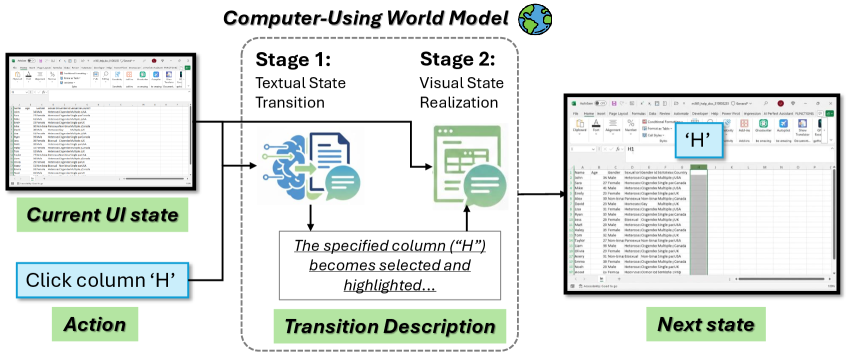
The proposed world model is called CUWM. It takes the current interface screenshot and a candidate action (say, "click Protect Workbook" or "select cell B2") and predicts the next UI state. The key move is to split the task into two stages.
First the model writes out a text description of what matters for the decision: what exactly changed after the action. That a pane opened, that a ribbon tab became active, that a dialog appeared, that the selection or the document content changed. Then a second module takes the original screenshot plus that description and synthesizes the next screenshot, trying to keep the unchanged parts of the screen intact and apply only the edits that belong. The design spends the model's attention carefully: instead of redrawing the whole interface, it concentrates on the changes the action actually caused.
Where the data comes from, and how the model is taught not to ramble
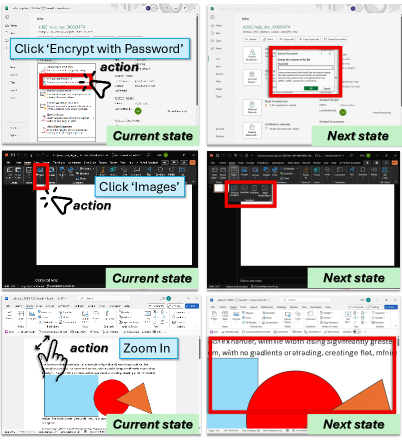
Data is the perennial problem in UI work: labeling before/after pairs by hand is expensive. So the authors collect offline transitions from real agent interactions with Microsoft Office, in a dataset built on GUI-360: triples of screenshot before, action, screenshot after. The text descriptions of the changes used for training are generated automatically by GPT-5 from the state pair and the known action. That gives a convenient target: not just guessing the image, but first learning to describe the change briefly and in a structured way.
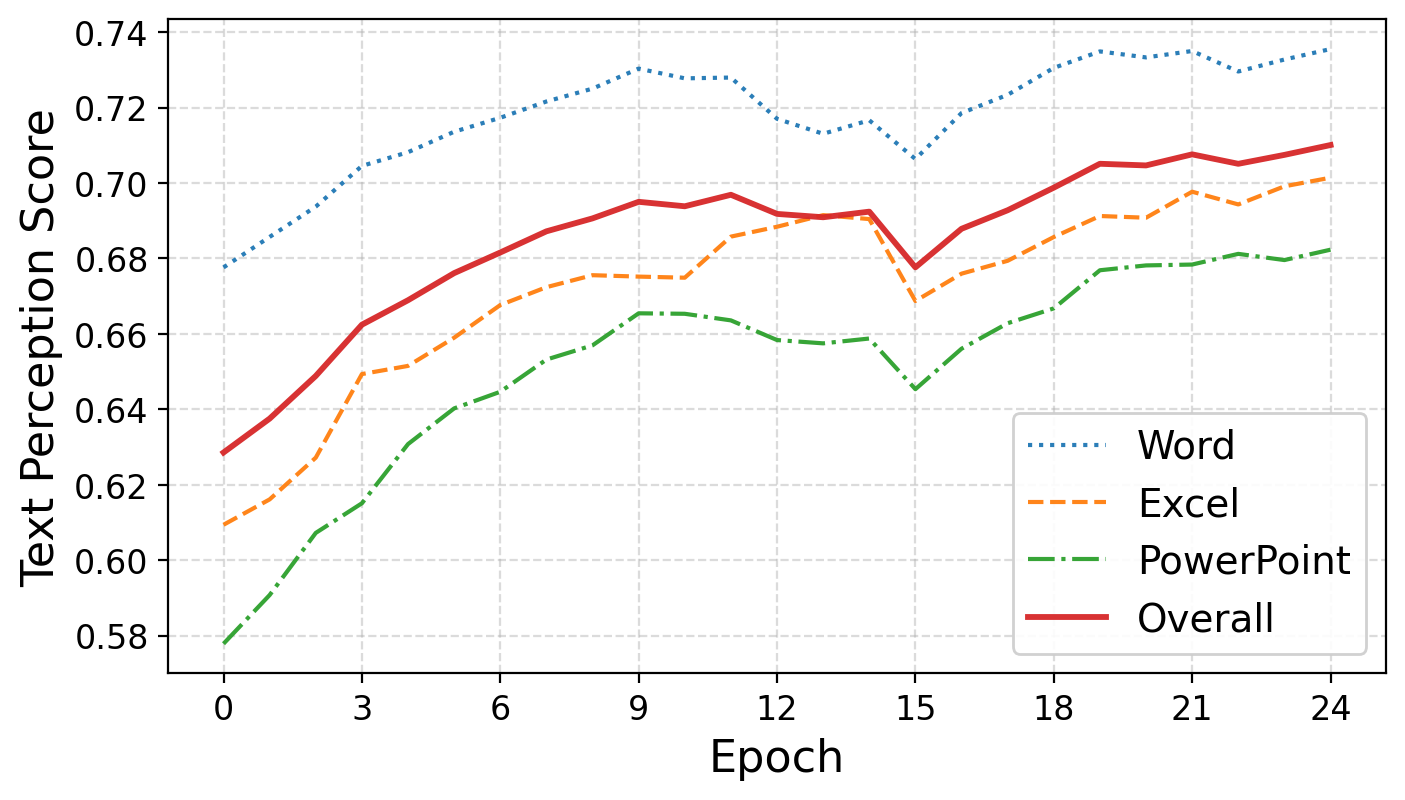
Then comes an important piece of tuning: the text module gets additional RL training so that its descriptions are not merely close to the labels but genuinely useful for the UI environment. The reward combines an LLM judge's score — how well the description matches the reference on the interface details that matter — with a length penalty. That reads as pragmatic: overly long descriptions tend to be vague and add noise, while overly short ones drop critical details such as the ribbon state or which pane is active.
What happens next?
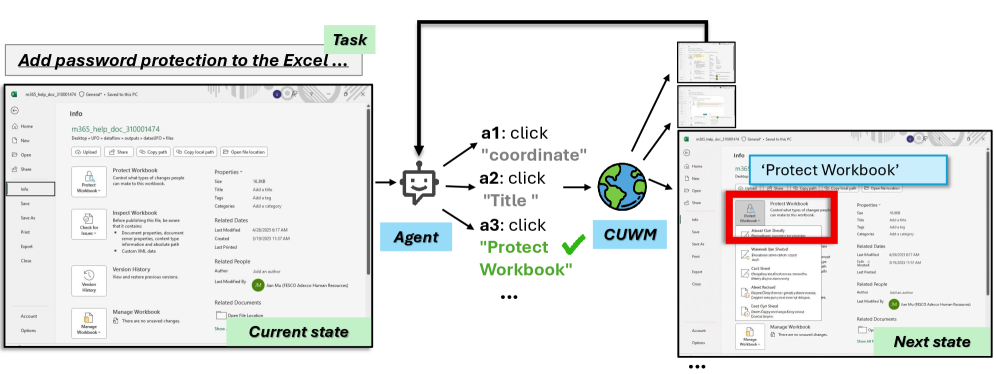
The main demonstration of what CUWM buys you is test-time action search. The idea is simple: at each step the agent proposes several actions, CUWM simulates what the screen would look like after each one, and the agent picks the best option based on those consequences. The agent itself stays frozen — nothing about the LLM improves, it simply gains a way to play the consequences out in its head at no cost.
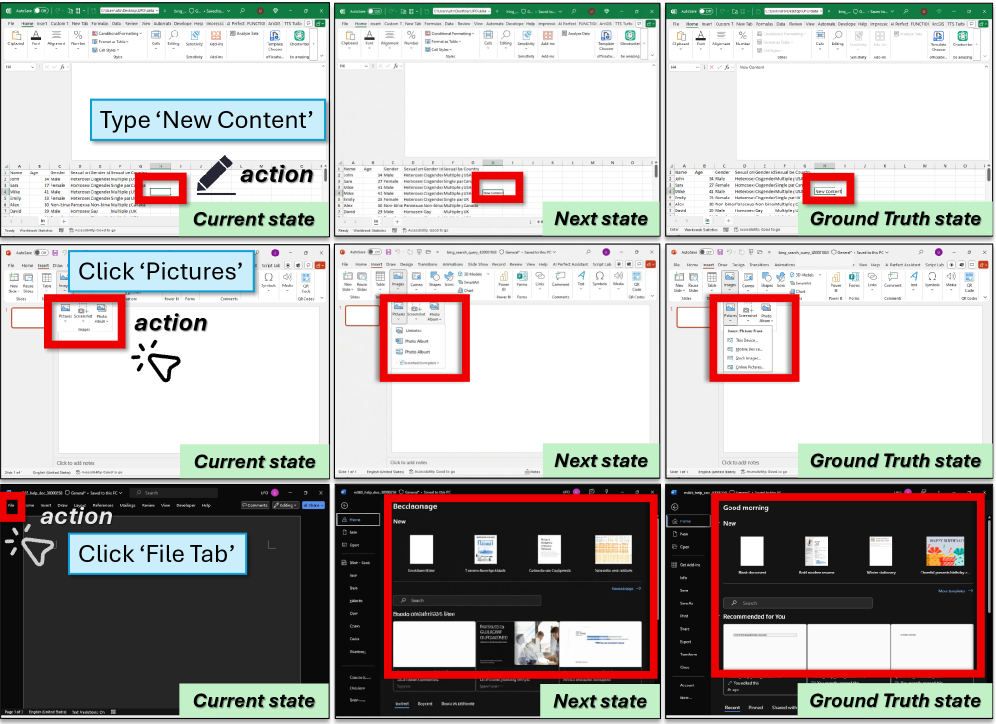
On the quality of the text transitions, training clearly helps: by the LLM judge's score, the base model lands around 0.60, after SFT around 0.68, and after SFT+RL slightly higher. The functional metric matters more, though: how much of the information the agent needs for its next step survives in the text prediction.
The visual side benefits from the two-stage split as well. Generating the next screen from the action alone is sharply worse. Once the visual module receives the intermediate text description of the change, the image lands much closer to reality, on-screen text becomes more legible, and metrics such as SSIM, LPIPS and FID improve. After joint fine-tuning — the full CUWM — the gap is at its widest.
And here is the practical payoff: world-model-guided action selection raises task success rates in Office. The authors report gains across several LLM and VLM agents; for GPT-4o the improvement is on the order of a few percent, and for Qwen3-VL-8B it is more pronounced. One detail worth flagging: purely image-based hints from the world model often turn out to be more reliable than a text-plus-image combination, possibly because the modalities conflict and the noise accumulates.
What this changes, and where to look next
The paper is a meaningful step toward computer-using agents that act more deliberately and more carefully. CUWM makes the case that even deterministic software needs a world model — not because the environment is random, but because real runs are expensive and risky.
The strength of the approach is the factorization: the meaning of the change on one side, its visual realization on the other. That makes the model more interpretable and gives a clean place to apply RL — you can align exactly the component that has to stay structured and useful for planning.
The limits are legible between the lines: the dataset is still fairly small, the domain is Office and nothing else, and mixing text with image in the planning step sometimes hurts. But as a base recipe for simulating UI transitions on the desktop, the work holds up: first learn to explain briefly what changed, and only then draw it.
AI paper breakdowns
Every day we read the new AI papers and retell what matters in plain language — no hype, no filler. If you want to see where AI agents are heading before everyone else, subscribe.
New breakdowns every day.
Follow on X