Qwen-UI-Agent: an AI agent that uses your phone and your computer
Everyone wants a general-purpose AI agent. The kind you can hand a problem to and say "sort it out." It opens the apps itself, finds the right buttons, compares the options, fixes a file on your computer, and when a flight-cancellation notice lands, it comes back with a plan ready to go.
The trouble is that almost all such demos look good on polished test suites and noticeably worse in live apps. On a real phone everything gets in the way: pop-ups, logged-out sessions, captchas, strange layouts, a slow network, unexpected confirmation screens. On a computer the problem is different: clicks alone are not enough. Sometimes part of the job is faster and more reliable through the command line.
That is exactly the problem Alibaba's team takes on in a long technical report on Qwen-UI-Agent. It is an agent for graphical interfaces that works across several environments at once: on the phone, on the computer, in the browser, and in a web-search mode. If you want a useful AI agent, teaching a model to press buttons is not enough. You have to build the whole system — the environment, the data, the training, the evaluation, and the product layer on top.
What they built
Qwen-UI-Agent is not just one more model that can click around a screen. It is a whole stack.
🟠 The agent works with mobile apps, desktop programs, the browser, and external search services.
🟠 It can do more than tap and type in an interface: it also runs commands in the command line and calls APIs.
🟠 It can emit more than one action per step — a batch of actions, when there is no need to wait for a new screen between them.
🟠 It was trained not only on short scenarios but on long trajectories — more than 100 steps.
🟠 On top of the agent sits a separate layer that lets tasks be launched by notifications and carried between phone and computer.
The usual agent demo has the same weakness: it looks like a collection of separate tricks. Here the authors are trying to assemble those tricks into a working operating system for an agent.
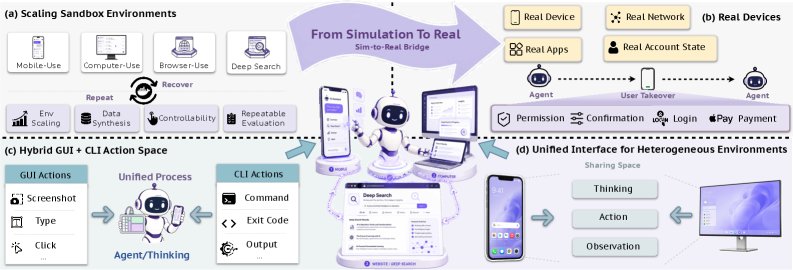
Why the focus on real devices
The gap between simulation and reality is wide for mobile agents.
In a sandbox everything is convenient. The app can be reset to its initial state. The data you need is already in place. No sudden captcha. No ads. No flaky network. But the user does not live in a sandbox.
So the authors built a farm of more than 100 physical phones and more than 150 apps. This is not a pile of gadgets on a desk. There is a controller tracking which phone is healthy, which account is logged in where, what network is available, where the environment broke, and where the agent itself got it wrong.
The system can tell a model error from an environment error. If an app froze or the network dropped, that should not be recorded as a miss by the agent. To make that call they analyze the full execution trajectory separately.
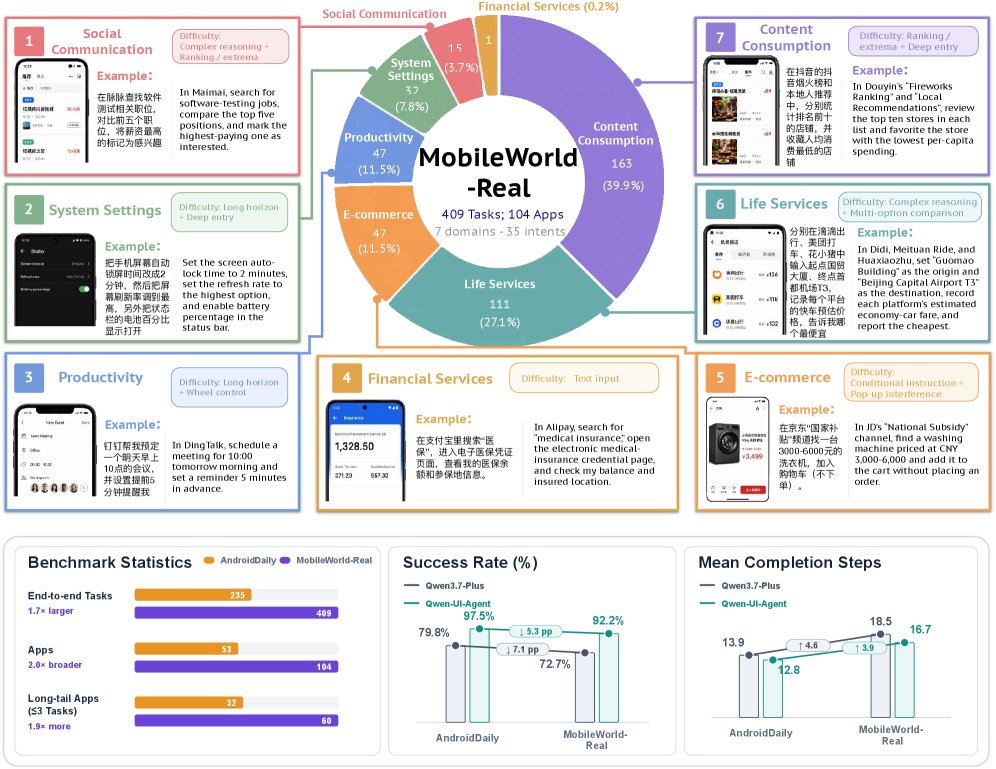
Out of the same effort came a new benchmark, MobileWorld-Real — 409 tasks across 104 apps on live Android devices. It is one of the paper's contributions. It shows how hard ordinary mobile life is for an AI agent. And that is where Qwen-UI-Agent scored 92.2% task success. For comparison, the closed models come in lower: Gemini 3.1 Pro at 86.2%, GPT-5.6 Sol at 85.4%, Claude Opus 4.8 at 84.7%.
This is the test of whether a skill carries over from the lab to a real screen.
How the agent acts: interface, command line, batched actions
Qwen-UI-Agent has a single action space. It can:
🟣 click, swipe, type, open apps, and press system buttons;
🟣 run commands in the command line;
🟣 call APIs;
🟣 ask the user when it needs confirmation or is missing information;
🟣 close out the task with a result.
On paper this looks obvious. Instead of a mouse-and-eyes-only logic, there are several ways to act. And some tasks are slow and pointless to do through the interface.
An example from the paper: to find the right photo among many similar ones, the agent does not open each one in turn. It can assemble a contact sheet of thumbnails with a single command line call, look it over quickly, and only then pick the one it wants through the interface. The command line becomes the fast hands; the graphical interface becomes the eyes that check the work.
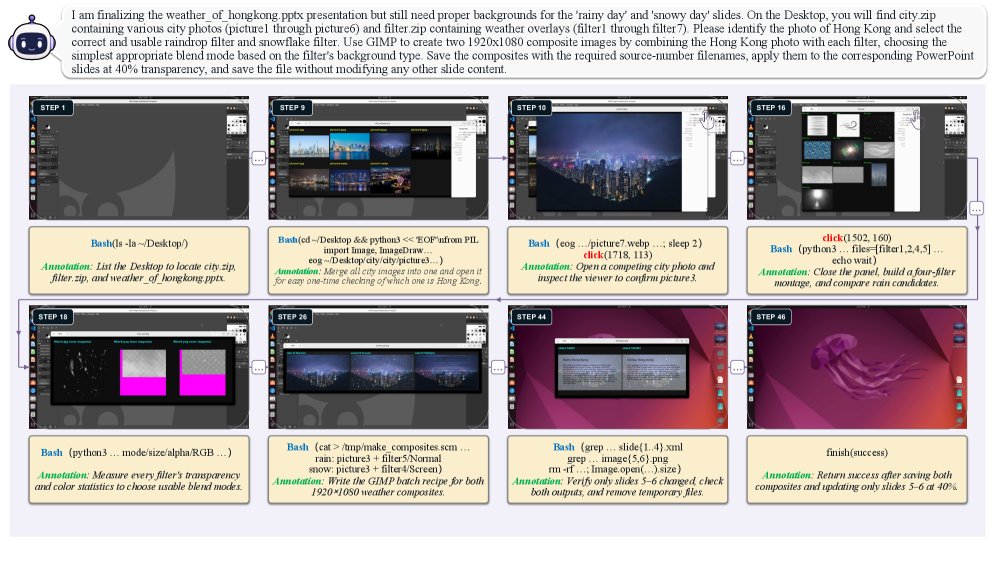
That buys two things at once.
🟠 Tasks finish faster, because part of the drudgery moves to the command line.
🟠 The agent covers more kinds of task, from visual navigation to file and data work.
One more detail: batched actions. When the agent sees that it can run several predictable steps back to back, it does not spend a separate model step on every click. Open the page search, type the query, press Enter. Or push through a long stretch of form filling until it hits a point that calls for thinking again.
On OSWorld-v2, the hard desktop benchmark, that produced a visible saving in steps. Qwen-UI-Agent averages 135.8 steps per task. That is fewer than a range of open models, which spend 170–320.
How it was trained
The architecture here is interesting, but the main contribution is still the data pipeline and the training.
First the authors collect data for supervised fine-tuning: trajectories where the agent solves tasks step by step. But they do not rely on hand labeling alone. They have an automated loop for improving the data — a flywheel of sorts.
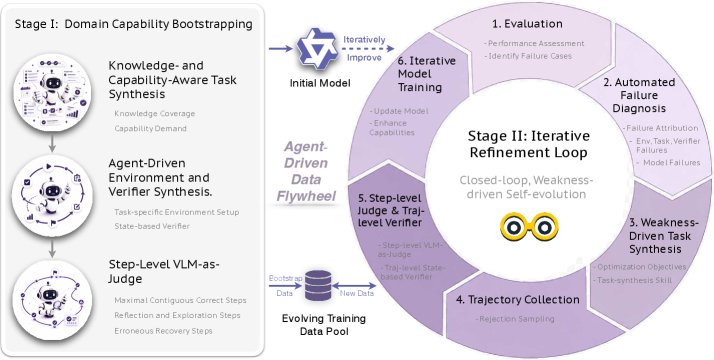
The scheme runs roughly like this:
🟣 strong models help invent new tasks;
🟣 agents set up environment states for those tasks;
🟣 then other agents or verifier models analyze where the current version fails;
🟣 after that the system generates a new batch of data aimed exactly at the weak spots;
🟣 the next training iteration uses that data.
On top of ordinary supervised fine-tuning come two layers of reinforcement learning.
The first layer fixes common local errors. The authors list six recurring patterns: the agent confuses similar buttons, gets sorting wrong, fails to collect every element it needs, declares success too early, loops on a single action, and makes poor use of rare but important actions such as a long press or a question to the user.
They assembled dedicated data for this and trained the policy to penalize those errors. The result: fewer loops and fewer false completions.
The second layer is long trajectories. Here the agent is taught to carry a task through to the end rather than perform individual steps elegantly. That uses reinforcement learning on the final outcome of the task. The environment runs in roughly 10,000 parallel instances to speed up experience collection.
The key effect of this training: the agent starts to verify more often that the task actually got done. Not "I think I created the file, so we're fine," but "let me open the file again and see whether the chart is really in there." It is a change in behavior that looks close to human.
What the numbers say
On results, this is fairly convincing. Qwen-UI-Agent turned out to be not a narrow mobile agent but a system that holds up across several modes at once.
On mobile tasks:
🟠 82.1% on MobileWorld
🟠 92.2% on MobileWorld-Real
🟠 97.5% on AndroidDaily
On desktop tasks:
🟠 79.5% on OSWorld-Verified
🟠 40.0% on the partial-progress metric on OSWorld-v2
On browser tasks:
🟠 73.6% on WebArena
On grounding to interface elements:
🟠 81.5% on ScreenSpot-Pro in zoom-in mode
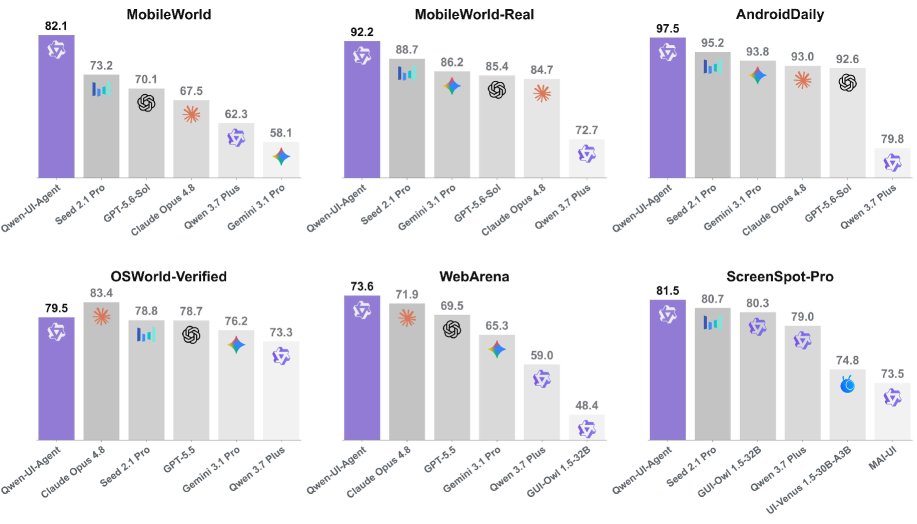
What is telling is not any single record but the spread. Models are usually good at either mobile tasks, or the browser, or desktop scenarios. Here you can see that the authors were building a base agent for the digital environment as a whole.
The most interesting part: proactivity and work across devices
On top of the model the authors added a separate layer that turns a set of actions into an assistant.
An example from the paper: a flight-cancellation notification arrives on the phone. Instead of waiting for the user to say something, the system links that event to the trip, to meetings in the calendar, and to personal preferences. Then it looks for alternative flights and trains, checks which ones you can still make, and prepares an option. Actions with consequences — rebooking, for instance — it asks you to confirm.
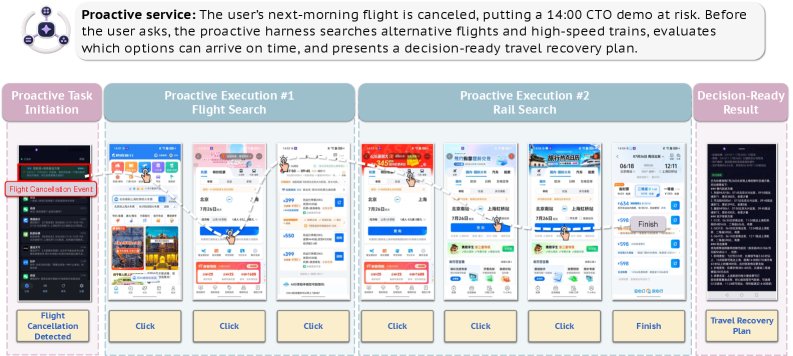
This already looks like the product logic of an assistant. It has notions of an event, a task in progress, memory about the user, and task state.
The same idea works for tasks that span devices. The agent can find something on the phone, continue processing it on the computer, send the result, and then hand the final choice back to the mobile app. The context survives the trip.
For a user that matters more than another 2% on a benchmark. Most of real digital life is smeared across apps and devices. An agent that cannot carry state between them hits a ceiling on usefulness fast.
Where the limits still are
The authors are candid about the limitations themselves.
🟣 On real devices, success is scored not by a strict programmatic verifier but by an automatic judge working from the trajectory. It is accurate, but not perfect.
🟣 Full automation of the agent's improvement does not work yet. People still watch the pipeline and step in.
🟣 Real devices are hard to scale. They are expensive, unstable, and need constant maintenance.
🟣 Even with batched actions, latency remains a problem. Long tasks still take a long time.
There is a lot of talk around AI agents about generality and much less about operational reality. Here you can see where the system runs into infrastructure rather than into the quality of the model.
The takeaway
If you want to understand where interface agents are heading, the thing to watch is not only how the model finds a button in a screenshot. It is the whole system.
Qwen-UI-Agent shows three things.
🟠 Real devices matter more than good-looking simulations if you want to get an agent to actual use.
🟠 A hybrid of graphical interface, command line, and API works better than betting on one way of acting.
🟠 Long tasks require more than reasoning: checking the result, recovering from errors, remembering state, and a good data pipeline.
In that direction, AI agents move closer to a genuinely useful digital assistant. To a system that can see a job through, step after step, on real screens.
AI papers in plain words
Every day we read the new AI papers and retell what matters in plain language — no hype, no filler. If you want to see where AI agents are heading before everyone else, subscribe.
New breakdowns every day
Follow on X