
Why the Same AI Agent Performs Differently
The same language model can solve a programming task—or stop prematurely, take unnecessary actions, and rack up a pointless compute bill. The reason often lies not in the model itself, but in the harness around it.
The harness determines three things:
🟠 what the model remembers from previous steps;
🟠 whether it needs to maintain a plan;
🟠 which actions it can perform in its working environment.
The authors of the paper “An Empirical Study of Harnesses for Coding Agents” examined these components separately. They did not compare complete, ready-made systems. Instead, they built a lightweight harness and changed only individual details. This made it possible to see what actually helps the model—and what merely adds cost.
The experiment covered four models, two benchmarks, and 176 matched configurations. There is no universal harness for AI agents. The right configuration depends on the model’s capabilities, the type of task, and the available context window.
What They Tested
The system is built around a reasoning–action–observation loop. At each step, the model receives the history, chooses a tool, performs an action in a container, and sees the result.
The researchers kept this loop unchanged and varied three components.
🟣 Planning. The model receives a separate task list and an `update_plan` tool. The plan is shown before each new call and updated as the work progresses.
🟣 Action space. In one configuration, separate tools are available for reading, searching, and editing files. In another, only a command shell is provided.
🟣 Context management. The system decides which old results to keep in the history and which to compress or remove.
The researchers tested three sizes from the Nemotron-3 family: 30, 120, and 550 billion parameters. The fourth model was Mistral-Medium-3.5-128B. They ran tasks on SWE-Bench Verified, which requires fixing real issues in repositories, and Terminal-Bench 2.1, where the agent performs long command-line tasks.
The context window ranged from 32,000 to 128,000 tokens.
Context Runs Out Before the Task Is Done
A long task can fill the context window quickly. The history accumulates prompts, model responses, search results, file contents, and command output. Once there is no room left, the agent stops—even if it was close to a solution.
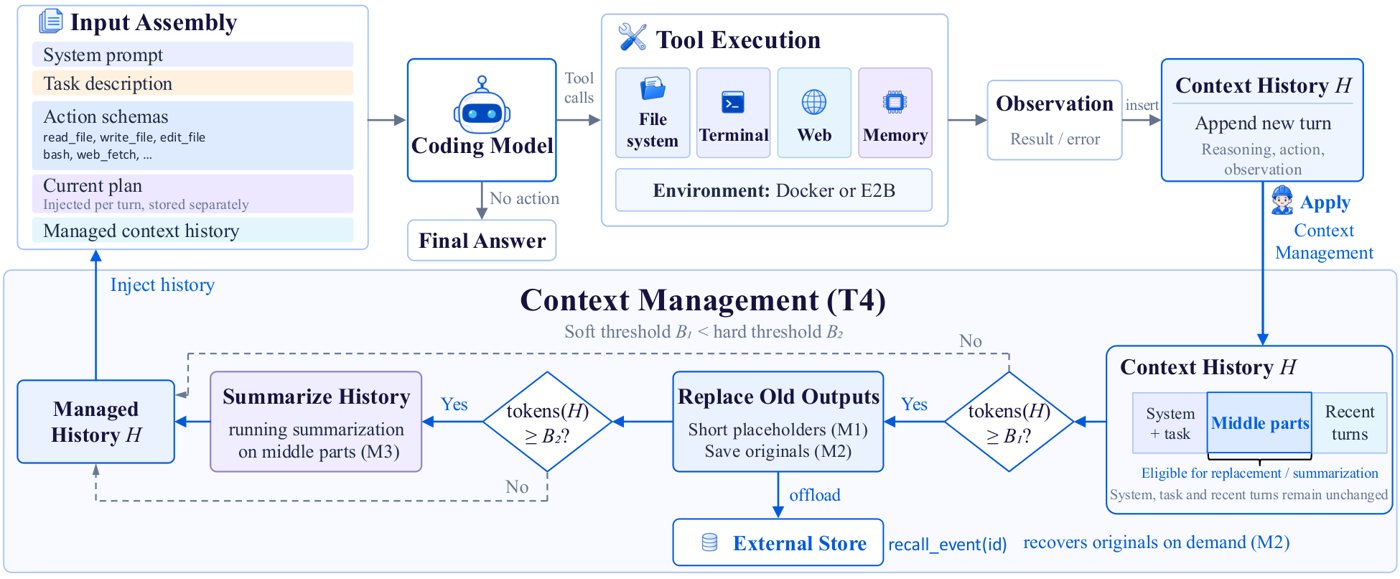
The authors compared five modes.
🟠 T0: The history is not compressed. Once the context overflows, the task ends with an error.
🟠 T1: Older, bulky results are replaced with short placeholders.
🟠 T2: The placeholders are supplemented by external storage. The model can retrieve the full result through `recall_event`.
🟠 T3: Older events are summarized in a separate call to the same model.
🟠 T4: The system first removes unnecessary data using a low-cost method. If the context is still too large, it then summarizes the history.
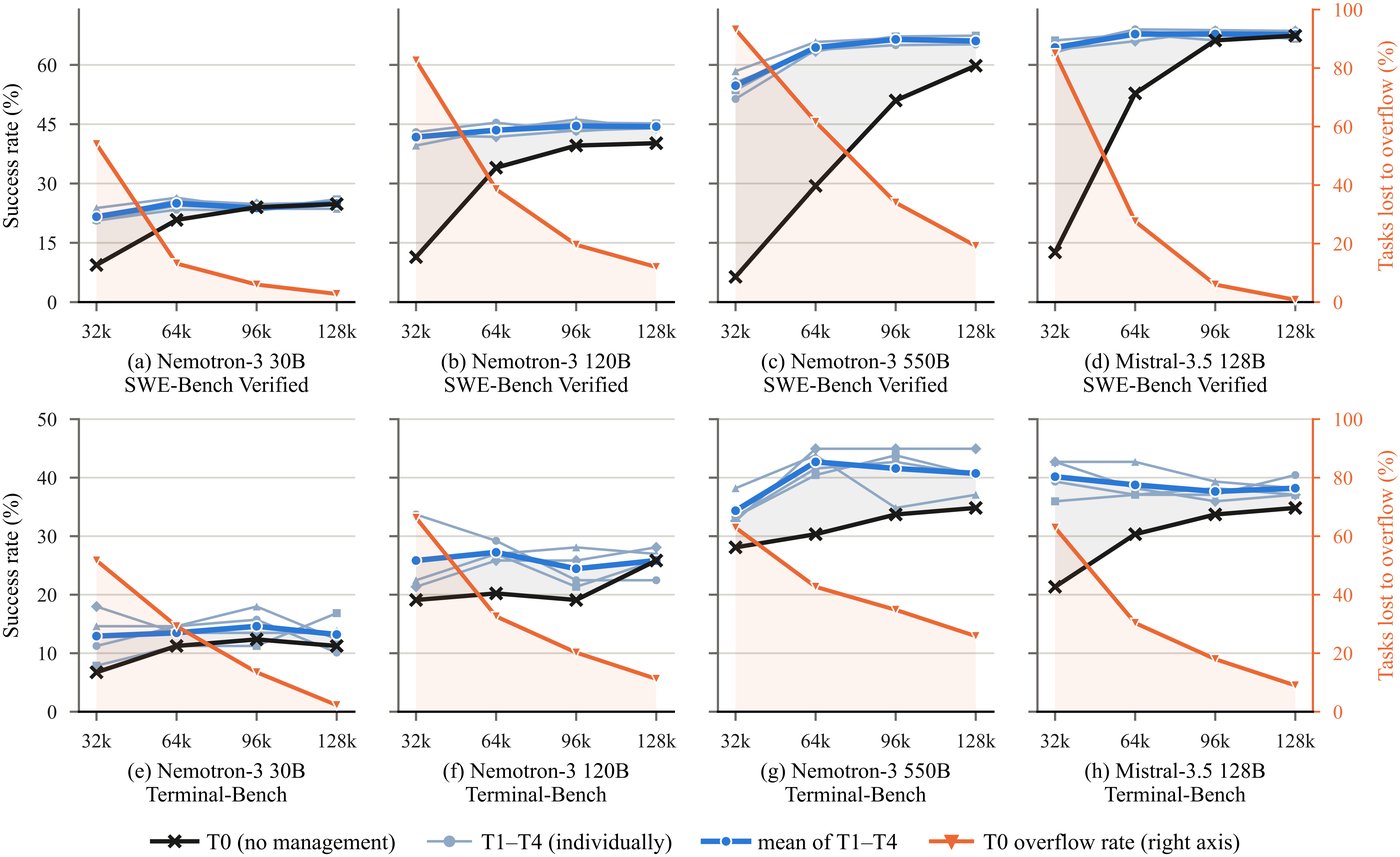
T4 offered the best cost performance. It provided no noticeable accuracy advantage over the other compression methods, but it called the model less often to summarize the history.
With a 32,000-token window, context management was especially important. On SWE-Bench, the average gap between configurations with and without compression was 35.7 percentage points. With a 128,000-token window, the gap narrowed to 2.7 points.
The reason is almost mechanical. Without context management, a 32,000-token window overflowed on 78.7% of SWE-Bench tasks. With a 128,000-token window, that figure fell to just 8.7%. All managed modes avoided overflow in every configuration tested.
Context management does not usually make an agent smarter. It gives the agent a chance to reach the next step.
External storage, meanwhile, offered almost no benefit. Models rarely called `recall_event` to retrieve removed content. In 56.3% of configurations, the tool was never called at all. With larger context windows, it nearly disappeared from the models’ behavior.
On average, adding retrieval changed the success rate by only fractions of a percentage point. Sometimes the result improved; sometimes it got worse. The mechanism makes the system more complicated without delivering a consistent gain.
Comparison of context compression, mechanism call frequency, and execution cost.
Planning Helps in Different Ways
The value of planning depended on the model’s capabilities.
For Nemotron-3 30B, planning noticeably improved performance: by 11.6 percentage points on SWE-Bench and 4.5 points on Terminal-Bench. But execution became more expensive. The model took more steps, called tools more often, and kept the history longer.
Without a plan, the model’s median trajectory length on SWE-Bench fell from 40 steps to 5. In 68.6% of runs, the agent did not edit a single file. With a plan, that figure dropped to 27.8%.
Here, the plan acts as scaffolding for a weaker model. It helps the agent avoid abandoning the task while searching for the right file and reach its first repair attempt.
The picture was different for larger models. For Nemotron-3 550B and Mistral-Medium-3.5-128B, planning had almost no effect on success rates, but reduced costs by roughly 30–32% on SWE-Bench. These models generally reached the repair stage without a plan. Planning helped them stop sooner and avoid repeating unnecessary checks after making changes.
🟣 For a weaker model, a plan extends execution until the agent reaches a useful action.
🟣 For a stronger model, a plan cuts unnecessary actions after the fix.
🟣 For a mid-range model, the result depends on the type of task.
Success rate and cost with and without planning for the four models.
Planning should not be treated as a free improvement. For one model, it increases accuracy; for another, it reduces cost; and for a third, it may change almost nothing.
Tools Versus the Command Shell
The second open question is whether to give the model a set of dedicated tools or leave it with only a command shell.
The structured toolset included file reading, writing, and targeted editing; content search; directory browsing; and command execution. Each tool had its own argument schema. The harness also checked that a file had been read before allowing it to be modified and ran a quick diagnostic after editing Python code.
For Nemotron-3 30B, the dedicated tools made a noticeable difference. They increased success rates by 15 points on SWE-Bench and 10.1 points on Terminal-Bench. Without them, the model often tried to call actions that were not available through the interface and never reached the code-editing stage.
For Nemotron-3 550B, the results were reversed. Using only a command shell increased success rates by 3.6 points on SWE-Bench and 5.6 points on Terminal-Bench. Costs fell by 53% and 30%, respectively. The stronger model combined several operations into a single command and made fewer calls.
The command shell also changes the size of each action. With a full set of tools, the model is more likely to edit a file in small increments. Through the command shell, it more often creates or replaces the entire file. For Nemotron-3 550B, the median size of the largest change grew from 18 to 54 lines, while the number of repeat edits to files that had already been changed fell from 4.6 to 1.5 per task.
Mistral’s results depended on the benchmark. On SWE-Bench, structured tools increased the success rate by 23.2 points. On the command-line tasks in Terminal-Bench, the command-shell-only mode performed 6.7 points better. In that setting, the shell was a better match for the nature of the work.
Comparison of the full toolset and command-shell-only mode by accuracy, cost, and share of command-shell calls.
What Happens Inside the Trajectories
A final success rate is not enough. It shows what happened, but not why. The authors therefore labeled trajectories by stage.
For SWE-Bench, they used five phases: locating the relevant code, reproducing the bug, fixing it, verification, and other actions. For Terminal-Bench, the phases were understanding the task, writing code, verification, and utility operations.
The overall picture was fairly clear.
🟠 Context management makes executions longer but barely changes the order of actions. The agent simply remains able to search, make changes, and verify for longer.
🟠 Planning changes where the agent stops. Weaker models reach the editing stage more often, while stronger models finish unnecessary verification sooner.
🟠 The action space changes the size of each step. Dedicated tools lead to a series of small operations, while the command shell makes it possible to combine them into larger commands.
On SWE-Bench, the weaker Nemotron-3 30B often stopped while still searching for the relevant file when it had no plan. For stronger models, most failures occurred later, during implementation of the fix. In other words, the same harness cannot work equally well for models at different capability levels.
What This Means for Developers
The results suggest several practical rules.
🟣 If the context window is limited, start by removing old output using a simple trimming strategy. It prevents overflow more cheaply than repeatedly summarizing the entire history.
🟣 Do not automatically add retrieval for removed events. First check whether your model actually calls it and whether it helps complete tasks.
🟣 For weaker models, planning can improve accuracy. For stronger models, it is more likely to reduce costs and unnecessary checks.
🟣 A set of dedicated tools is useful when a model struggles to manage a command shell. A stronger model may benefit more from a smaller, simpler interface.
🟣 Test configurations across different task types. Fixing repository issues and handling command-line workflows require different action spaces.
There are limitations as well. Planning and action space were tested only with a 128,000-token context window. Each task was run only once. Terminal-Bench contains 89 tasks, so some of the differences there should not be considered conclusive. In addition, the tool comparison changed several things at once: the available actions, prompts, file-state tracking, and automatic diagnostics.
Conclusion
A coding agent’s harness is part of the compute system, not merely an interface detail. It determines how many steps the model can take, which actions are available, and how much the solution will cost.
Context management is primarily about preventing premature termination. The best balance comes from a sequence of steps: first remove old output cheaply, then summarize selectively.
The value of planning depends on the model’s capability. For weaker models, it helps them reach the repair stage; for stronger models, it helps them finish sooner.
Tools should match both the model and the task. Structured actions support models with limited command-shell control. Stronger models often work more efficiently with a single command shell, especially on command-line tasks.
The harness should therefore be chosen based on three parameters: model capability, task type, and context budget. A universal configuration is the exception, not the rule.
Read next
 How AI Simulates a User’s Thoughts
 Coding agents skip looking at the app when the task gets long
 AI covers six roles in game development, but skills rarely transfer
 LLMs misread motives when the story comes through a biased user
 Given a store for a year, the top-earning agent ranked 16th of 18 on fraud
 Five levels of self-improving AI, and why level 5 barely exists
 An AI agent built a playable shooter over 70 autonomous iterations
 An editable graph of next steps beats memory for long-horizon agents
 A library rebuilt from 50 design docs matches its hand-checked models
 Compiling a paper into a repo-level spec cuts AI's algorithmic shortcuts
 Imagining the poster first lets a coding agent build it in editable layers
 Distilling 1,000 GitHub repos into agent skills more than doubles MLE-bench scores
AI reviews in simple way
Every day we read fresh AI papers and retell the essentials in plain human language — no hype, no fluff. If you want to see where AI agents are heading before everyone else, subscribe.
New reviews — every day
Follow on X