An AI agent can run a video-generation program without errors and still produce a video with awkward camera work, unreadable captions, or out-of-sync narration. VibeVideoAgent builds image and audio checks into the workflow: it sends the agent concise feedback without cluttering its context with raw footage.
The main idea
To help an AI agent make better videos, it’s not enough to check that the program ran. The agent needs to inspect the output as it works, verify specific requirements, and make sure its fixes actually worked.
🟠 A separate multimodal module analyzes the visuals and audio. The coding agent receives only brief findings that identify when and where a problem occurs.
🟠 The checks work on source materials, individual frames, short clips, and full videos—even when they use different timelines.
🟠 The agent tests its riskiest decision with a small draft first, then assembles the video and fixes any problems it finds.
🟠 On a benchmark of 239 tasks, this approach improved average video-quality scores for all three models.
What is VibeVideoAgent?
VibeVideoAgent is a system for checking video projects that requires no model fine-tuning and isn’t tied to a particular editing program. It separates the agent that writes code from the module that examines frames and listens to audio.
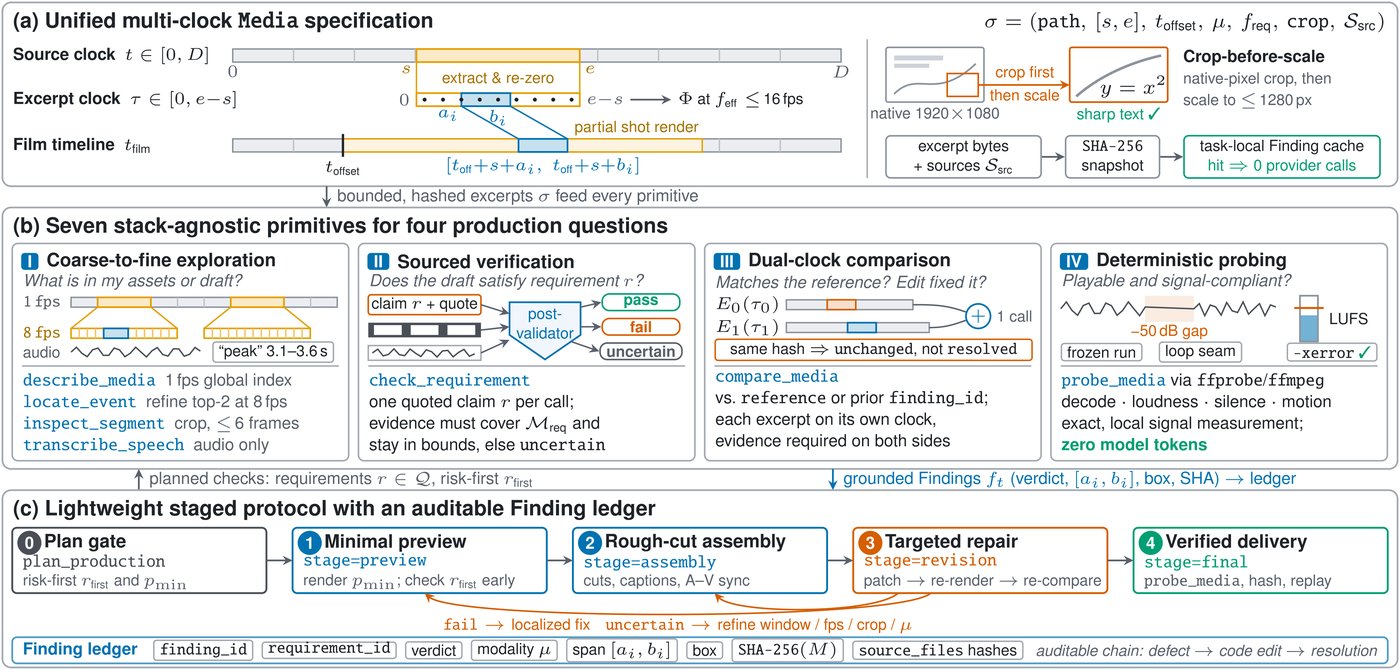
VibeVideoAgent overview: a unified representation of source materials and drafts, seven media-checking tools, and a workflow from planning to finished video.
The system has three parts.
🟣 A unified representation of the material. For each file, the system records its path, the relevant segment, its data type, and where it belongs in the film. This makes it possible, for example, to check a four-second clip from one scene and match it to a point on the full timeline. A frame can be cropped and then enlarged, keeping small captions and details such as hand movements clear. File hashes help confirm that the system is checking the same video and source code produced after the latest edit.
🟣 Seven media tools. Some tools briefly describe the material, search for a particular object or action, or inspect a selected clip. Others transcribe speech, check a specific requirement, or compare video versions. The final tool measures technical properties of the file, such as corruption, silence, and frozen frames.
🟣 A production workflow. Before writing code, the agent maps the task’s requirements to scenes and picks one risky decision to test first. It then creates a small draft, assembles a rough cut, fixes individual problems, and checks the finished file.
Frames and audio don’t enter the coding agent’s working history. A separate module analyzes them in a short, isolated request. The agent gets a concise note—for example, that the character is holding the backpack instead of putting it on—not the video clip and its audio track.
Findings are linked to a time, a data type, and, when needed, a region of the frame. If a check needs to confirm that the speech matches the visuals, the system requires evidence from both audio and video. If there isn’t enough information to reach a conclusion, the answer is “unclear,” not a confident “all good.”
How it works: a backpack in a short film
In one task, the agent creates a short film about a person’s life across six scenes. The character must remain recognizable at different ages, and in the scene set during their youth, they must sling a backpack over their shoulder. The system checks the work step by step.
🎬 The agent breaks down the task, maps its requirements to scenes, and identifies the biggest uncertainty: whether the character’s appearance will stay consistent across different ages. Before making the whole film, it creates one frame with several versions of the character.
🔎 The checking module evaluates the frame and confirms that the character is visible, noting where. The agent proceeds using the approved design.
⚠️ After the first draft is assembled, a check of the youth scene reveals a problem: the character catches the backpack but keeps holding it. The program itself ran without error. In the family scene, the system also finds two problems with how the action is staged.
🛠️ The agent edits the code for those scenes and renders the video again. The system then compares the old and new versions to verify the fixes, accounting for possible changes in scene length.
✅ At the end, a separate check confirms that the file plays and that the video loops without a noticeable jump. If the relevant moment wasn’t included in the checked clip, the system doesn’t count the requirement as met.
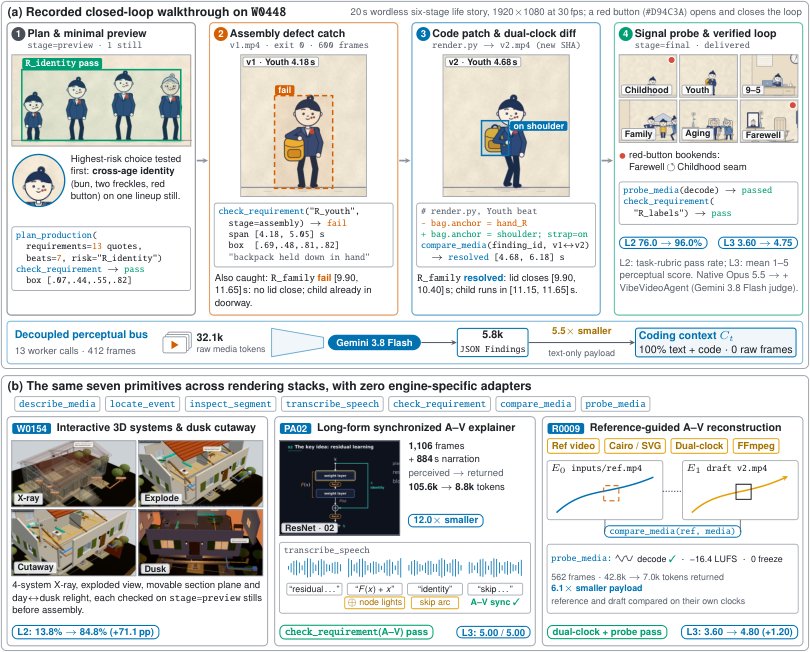
Checking a short film: an early frame confirms the character design, draft analysis finds problems, and version comparison verifies the fixes.
The perception model identifies what appears in the frame, while the agent edits the code and decides how to fix the scene. Neither can treat a problem as resolved without checking again.
How it’s evaluated
The authors compare three agent models in their standard setup and with VibeVideoAgent. For each task, they use the same coding model, keep the run conditions consistent, and use a fixed perception model. Agents can’t read source images or videos directly or call third-party models; all checks must go through the designated tools. After the video and source code are saved, two judge models assign the final scores.
The evaluation covers three levels. The first checks technical submission requirements, the second checks whether the task’s requirements were met, and the third rates video quality on a scale of one to five: visuals, aesthetics, content logic, motion and timing, audio, and audio-video synchronization.
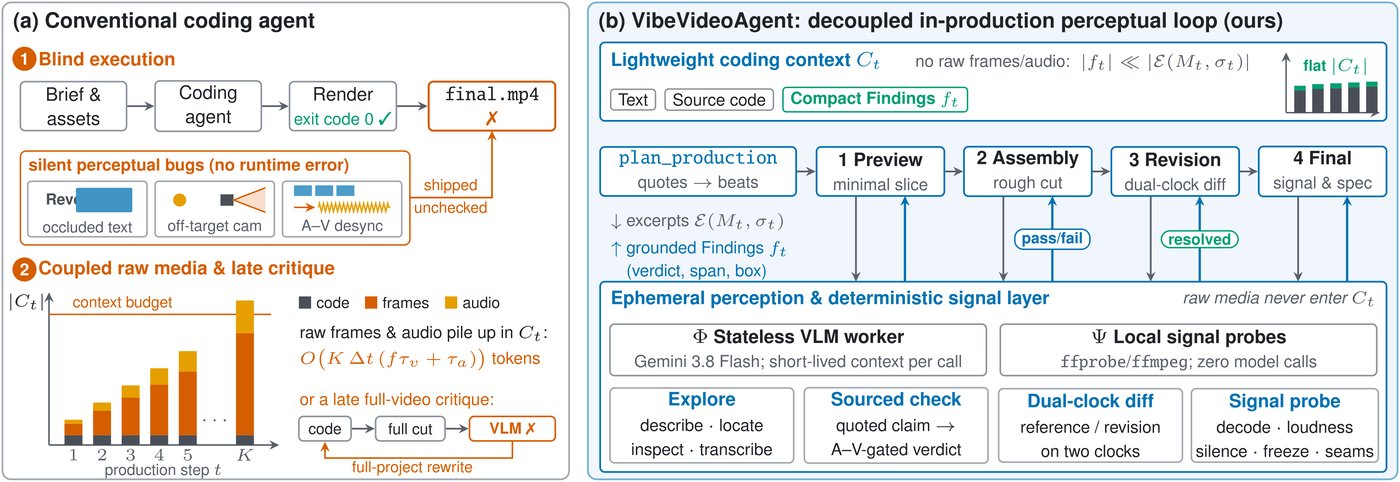
A standard agent either misses defects in the finished video or adds frames and audio to its working history. VibeVideoAgent separates the analysis into another module and returns concise, verifiable findings.
The authors also run ablation tests, disabling requirement checks, version comparison, technical measurements, and the early draft one at a time. This helps reveal which components affect the results. To test whether the findings depend on the judge model, an independent judge also evaluates the videos.
The numbers
All three models produced better-quality videos, though the size of the improvement varied. The clearest overall gain was in audio and visuals: checking the video as it’s made helps catch mismatches between narration and what’s happening on screen.
Takeaway
Checking work during production helps an agent catch problems that don’t show up in program logs and fix them before the final render. The approach worked best on tasks that required speech and visuals to line up. The comparison used consistent conditions, but individual scores still depend on the judge models.
There are limitations. The module analyzes selected clips and frames at a limited sampling rate, so a brief defect or skipped section may go unnoticed. And even when the agent finds a problem, it may not fix it: in the trials, major code rewrites sometimes improved the video’s pacing but made it harder to meet other requirements. Making targeted edits matters as much as the feedback itself.
Next, the authors plan to teach smaller models how much to change and how polished an early draft should be. For now, the system shows how video checks can be built into an agent’s workflow, but it can’t guarantee that every detected problem will be fixed or that unchecked parts of a video are flawless.
In practice
The framework could help teams that create videos with code, including educational-video developers, motion designers, and video-production specialists. An agent could check drafts as it works, flagging unreadable captions, scene errors, or mismatches between speech and graphics, then verify the fixes without loading every frame and audio track into its coding context. The authors have released the implementation and provide integrations for Claude Code and Codex CLI through MCP. Their experiments used Gemini 3.8 Flash for perception. This is a research system, and its results were evaluated on VibeVideoBench, so teams should test its checks on their own material before using it in production.
Related work
This work builds on code-based video generation, where an agent writes a program and the video is assembled from editable scenes, graphics, and audio. VibeVideoBench evaluates whether these agents can complete tasks and produce finished videos; here, the same set of 239 tasks becomes a testbed for the creation process itself. Rather than evaluating only the final result, VibeVideoAgent closes the perception loop: a separate module checks short previews and finished clips, compares versions, and sends concise feedback to the coding agent without overloading its context. This improves results across all three models under the same run conditions, especially for audio-video synchronization. Unlike Coda-DaVinci, which explores 3D assets, physics, and prompts for controlling generation, this approach doesn’t steer a separate video model. It helps the agent find and fix problems directly in the editable project.
Read next
 Coding4Games: Humans beat all AI agents in ten games.
 WeVisForensics: How an AI Agent Finds Generated Videos
 Game2Player: How AI Agents Train in Games
 How to teach an AI agent to develop an app from scratch
 InclusionMed: Which AI should I choose for medical tasks?
 Why Is It Difficult for an AI Agent to Act in the Real World?
 WorldFoundry: How can you distinguish video generation from world
 How AI Can Enhance an Individual’s Intelligence
 FrontierPhysics: Let’s see whether AI agents can make discoveries
 How AI Chooses the Right Model for Each Task
 CaPtain: How to control a robot using a small AI model
 WorkFactory: Hundreds of thousands of professional tasks helped train
AI reviews in simple way
Every day we read fresh AI papers and retell the essentials in plain human language — no hype, no fluff. If you want to see where AI agents are heading before everyone else, subscribe.
New reviews — every day
Follow on X